
How to reset the MariaDB password in XAMPP
Reset or change the MariaDB (MySQL) root password in XAMPP on Windows using the mysqladmin command-line tool through the XAMPP Shell.
Reset or change the MariaDB (MySQL) root password in XAMPP on Windows to secure the local database server or recover from a forgotten password.
Prerequisites
- XAMPP installed on Windows with MariaDB (MySQL) running. See How to install XAMPP on Windows.
- MariaDB started from the XAMPP Control Panel.
Step-by-Step: Reset the MariaDB Root Password in XAMPP
Open the XAMPP Control Panel. Click the Shellbutton to launch the XAMPP command-line shell.
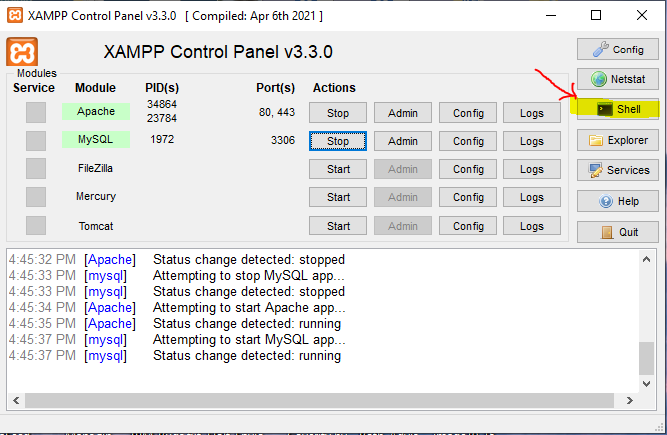
Run the
mysqladmincommand to set a new root password. Enter the following command in the XAMPP Shell:mysqladmin --user=root passwordThe
mysqladmintool connects to the MariaDB server and prompts for a new password. This command works when the current root password is empty (the XAMPP default).Enter the new password when prompted. Type the new password and press Enter. MariaDB updates the root user password immediately.
Reset the Password When the Current Password Is Known
If the root user already has a password, include the current password with the
-p flag:
mysqladmin --user=root -p passwordThe
mysqladmin tool prompts for the current password first, then for the new password.
How to Verify the MariaDB Password Reset in XAMPP
Open the XAMPP Shell and connect to MariaDB with the new password:
mysql --user=root --password={YOUR_NEW_PASSWORD}MariaDB displays the
MariaDB [(none)]> prompt if the password is correct.
Common Issues When Resetting the MariaDB Password in XAMPP
"ERROR 1045 (28000): Access denied for user 'root'@'localhost'."The current root password is not empty. Use the
-p flag with
mysqladmin to supply the existing password before setting a new one.
phpMyAdmin stops working after the password change.phpMyAdmin uses the root credentials stored in its configuration file. Open
C:\xampp\phpMyAdmin\config.inc.php and update the password value in the
$cfg['Servers'][$i]['password'] line to match the new MariaDB root password. Restart Apache HTTP Server from the XAMPP Control Panel.