
How to locate the MariaDB error log in XAMPP
Find the MariaDB (MySQL) error log file in XAMPP on Windows to diagnose database startup failures, query errors, and connection issues.
Find the MariaDB (MySQL) error log file in XAMPP on Windows to diagnose database startup failures, shutdown errors, and query problems.
Prerequisites
- XAMPP installed on Windows. See How to install XAMPP on Windows.
Step-by-Step: Locate the MariaDB Error Log in XAMPP
Open the XAMPP installation directory. The default path on Windows is
C:\xampp.Navigate to the MariaDB data directory at
C:\xampp\mysql\data\.Locate the file named
mysql_error.log. The full default path isC:\xampp\mysql\data\mysql_error.log.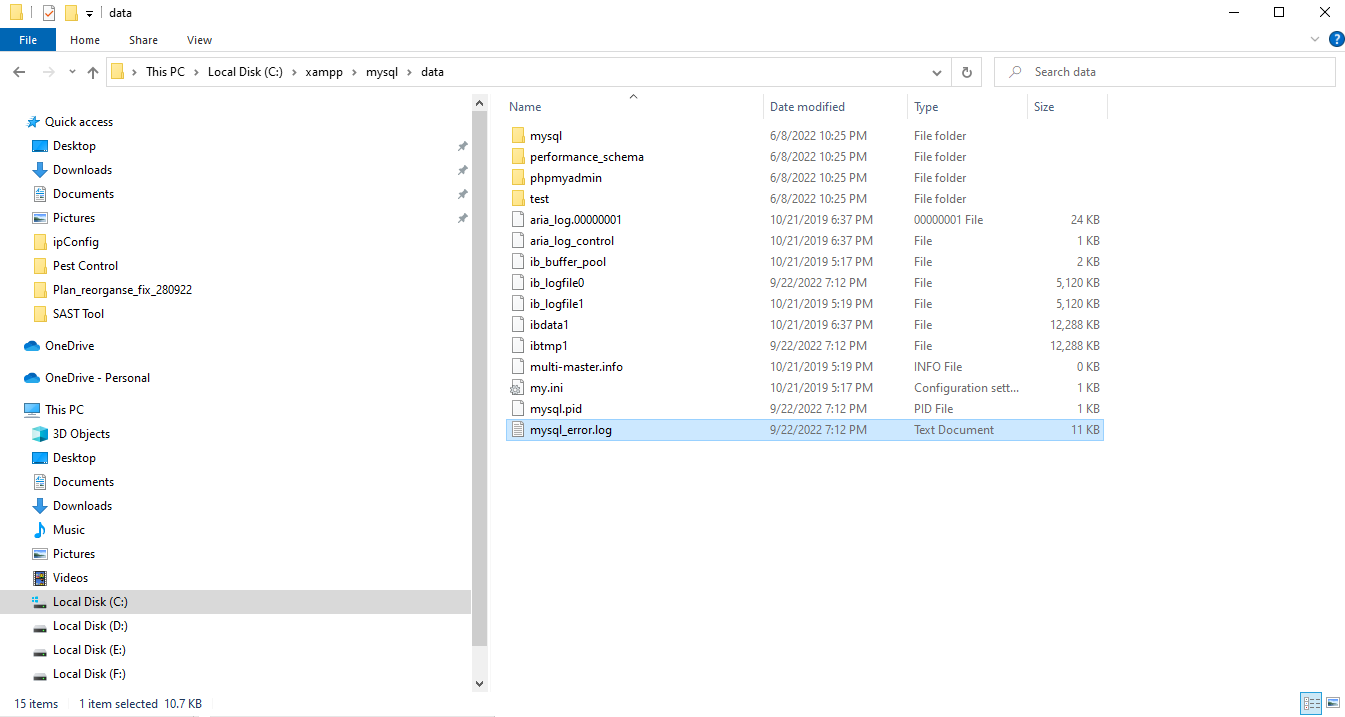
Open
mysql_error.login a text editor. The most recent entries appear at the bottom of the file. Error messages include timestamps, error codes, and descriptions of the issue.
How to Verify the MariaDB Error Log Location in XAMPP
Open the MariaDB configuration file at
C:\xampp\mysql\bin\my.ini. Search for the
log-error directive. The value shows the file path where MariaDB writes error log entries. If the
log-error directive is not set, MariaDB writes errors to the default location in the data directory.
Common Issues When Locating the MariaDB Error Log in XAMPP
The error log file does not exist.MariaDB creates the error log file on first startup. Start MariaDB from the XAMPP Control Panel to generate the file.
The error log is empty.MariaDB had no errors to record. The log populates when MariaDB encounters startup failures, connection errors, or query problems. See XAMPP: MySQL shutdown unexpectedlyfor common errors that generate log entries.