
Traceroute: !P (Incompatible protocol)
Fix the traceroute !P protocol unreachable error caused by the destination host rejecting UDP or ICMP probes due to protocol filtering or misconfiguration.
- When Traceroute Produces the !P Error
- What Causes the "!P" Error in Traceroute
- How to Fix "!P" in Traceroute
- 1. Switch to ICMP probes on Linux or macOS
- 2. Switch to TCP probes on Linux or macOS
- 3. Verify the destination supports the protocol
- 4. Check the local hosts file for misconfigurations
- 5. Restart the network router
- How to Verify the Fix
- Edge Cases and Variations
- Related Traceroute Errors
Traceroute displays the
!Pcode when a router or destination host returns an ICMP Destination Unreachable message with code 2 (Protocol Unreachable), indicating that the target does not support the transport protocol used by the probe.
When Traceroute Produces the !P Error
Traceroute shows
!P at a specific hop when the responding device cannot process the protocol layer of the incoming probe packet. The
!P code replaces the normal round-trip time in the traceroute output.
Traceroute triggers
!P most commonly when the destination host does not have a listener for the protocol used by the probe. On Linux and macOS, traceroute sends UDP probes by default. A destination that disables UDP processing at the kernel level or runs a host-based firewall that strips UDP entirely returns the ICMP Protocol Unreachable response.
What Causes the "!P" Error in Traceroute
Traceroute's
!P error corresponds to ICMP Type 3, Code 2 (Protocol Unreachable). A host or router generates this response when the IP layer receives a packet with a transport protocol number that the system does not implement or has explicitly disabled.
Traceroute on Linux and macOS sends UDP datagrams (IP protocol number 17) by default. The destination host returns ICMP Protocol Unreachable when its network stack does not handle UDP. This scenario is uncommon on standard operating systems but occurs on embedded devices, appliances, and stripped-down firmware images that support only TCP.
Traceroute encounters the
!P error when a firewall between the source and destination filters traffic based on the IP protocol field. Some deep packet inspection (DPI) firewalls reject entire protocol types rather than individual ports, which produces the
!P response.
How to Fix "!P" in Traceroute
1. Switch to ICMP probes on Linux or macOS
Run traceroute with ICMP Echo Request probes instead of the default UDP probes. ICMP is supported by virtually all IP-capable devices:
sudo traceroute -I example.comICMP mode requires root or sudo privileges. If the destination responds to ICMP Echo Requests, traceroute completes without the
!P error.
2. Switch to TCP probes on Linux or macOS
Run traceroute with TCP SYN probes targeting port 80 or 443. TCP is the most commonly permitted transport protocol across firewalls:
sudo traceroute -T example.comSpecify a different port with the
-p flag if the destination runs a service on a non-standard port:
sudo traceroute -T -p 443 example.com3. Verify the destination supports the protocol
Confirm that the destination host accepts UDP traffic by testing with a direct connection:
nc -u -z -w 3 example.com 33434The
nc (netcat) command sends a UDP packet to the traceroute default port. If netcat receives no response or reports a connection refused error, the destination does not accept UDP traffic on that port.
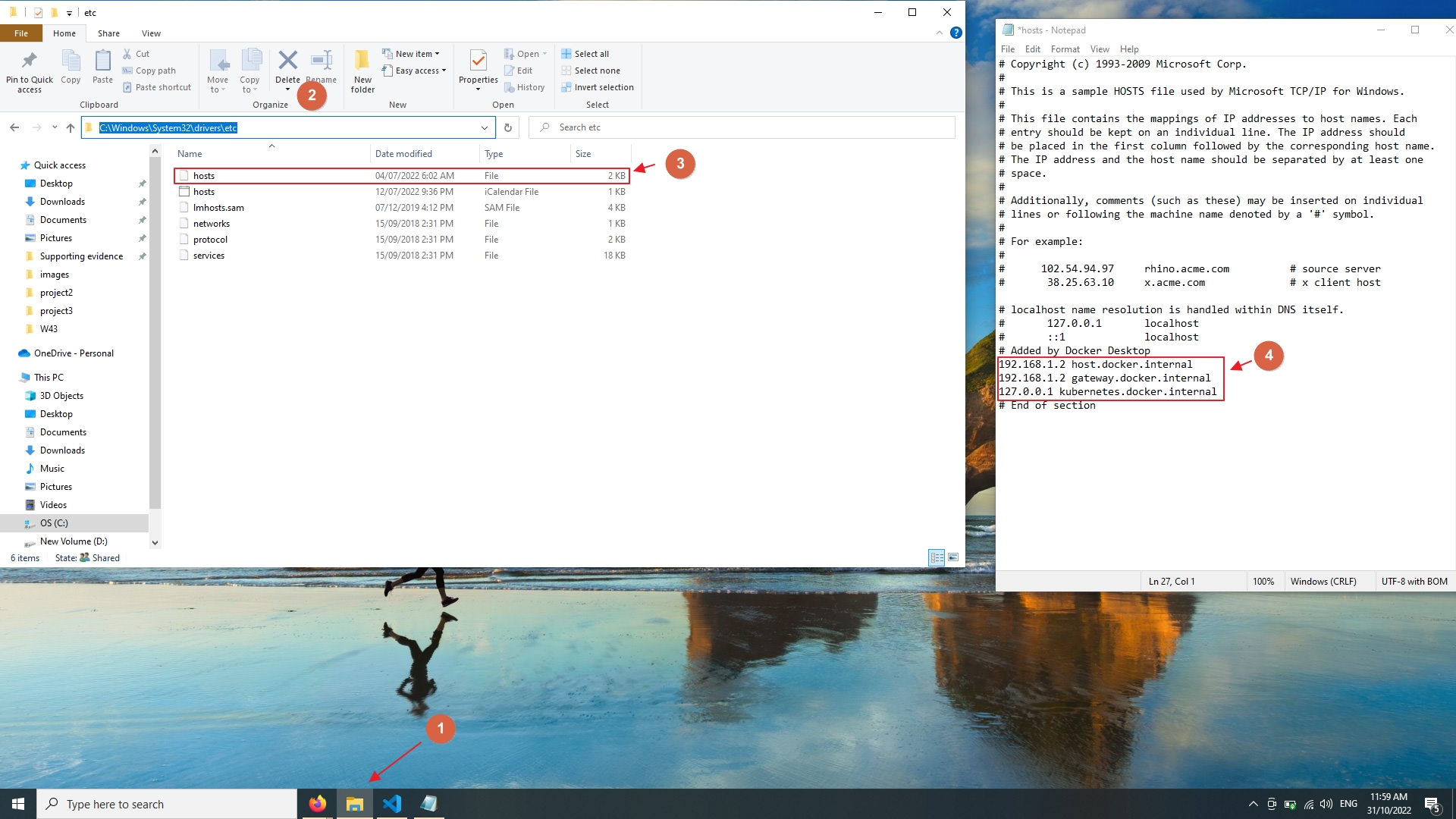
4. Check the local hosts file for misconfigurations
An incorrect entry in the hosts file can redirect traceroute to the wrong destination, producing unexpected protocol errors. Verify the hosts file:
Linux / macOS:
cat /etc/hostsWindows:
Open
C:\Windows\System32\drivers\etc\hosts in a text editor. Remove entries that map the target hostname to an incorrect IP address.
5. Restart the network router
Power-cycle the local router if the
!P error occurs on the first hop or a locally connected gateway. Temporary state corruption in router firmware can produce incorrect ICMP responses. Unplug the router for 30 seconds, then reconnect and retry traceroute.
How to Verify the Fix
Run traceroute to the same destination after switching the probe protocol. Traceroute should display valid round-trip times without the
!P code:
sudo traceroute -I example.comA successful trace shows numeric millisecond values at each hop and reaches the destination on the final line.
Edge Cases and Variations
Traceroute shows
!P at the final hop only.The destination host explicitly rejects the traceroute probe's protocol. All intermediate routers forwarded the packet without issue. Switch to ICMP or TCP probes to complete the trace.
Traceroute shows
!P on an embedded device or IoT target.Embedded systems with minimal IP stacks often lack UDP support. Use ICMP probes (
-I) or verify connectivity with ping, which uses ICMP by default.
Traceroute shows
!P intermittently at the same hop.A load balancer or multi-path routing distributes probes across different paths. Some paths support the protocol while others do not. Run traceroute multiple times to identify the consistent pattern.
Related Traceroute Errors
Traceroute: !A (Administratively prohibited)— occurs when a firewall or ACL explicitly blocks the probe, producing ICMP Type 3, Code 13. The
!A error indicates intentional filtering, while
!P indicates protocol incompatibility.
Traceroute: !N (Network unreachable)— occurs when no route exists to the destination network, producing ICMP Type 3, Code 0. The
!N error is a routing issue, not a protocol mismatch.