
Traceroute: !A (Administratively prohibited)
Fix the traceroute !A administratively prohibited error caused by firewall rules or ACLs blocking ICMP or UDP probe packets at a specific hop.
- When Traceroute Produces the !A Error
- What Causes the "!A" Error in Traceroute
- How to Fix "!A" in Traceroute
- 1. Identify the blocking hop
- 2. Switch the probe protocol on Linux or macOS
- 3. Check the local firewall on Windows
- 4. Contact the network administrator
- How to Verify the Fix
- Edge Cases and Variations
- Related Traceroute Errors
Traceroute displays the
!Acode when a router returns an ICMP Destination Unreachable message with code 13 (Communication Administratively Prohibited), indicating that a firewall or access control list (ACL) blocks the probe at that hop.
When Traceroute Produces the !A Error
Traceroute shows
!A next to one or more hops when an intermediate router or firewall explicitly rejects the probe packet and sends back an ICMP Type 3, Code 13 response. The
!A code appears inline with the hop output, replacing the normal round-trip time value.
Traceroute also triggers
!A when the destination network's edge firewall blocks inbound UDP or ICMP traffic based on a configured access control list. Corporate networks, cloud provider security groups, and ISP border routers commonly apply these filters to restrict diagnostic traffic.
What Causes the "!A" Error in Traceroute
Traceroute's
!A error maps directly to ICMP Destination Unreachable Type 3, Code 13. A router sends this response when it matches the incoming probe against a deny rule in its access control list or firewall policy. The router actively rejects the packet rather than silently dropping it.
Traceroute probes on Linux and macOS use User Datagram Protocol (UDP) packets by default, targeting high-numbered destination ports (33434 and above). Firewalls that restrict outbound or transit UDP traffic to unknown ports trigger the
!A response. Windows
tracert uses ICMP Echo Request packets, which firewalls also commonly filter.
Traceroute encounters the
!A error more frequently on paths that cross enterprise or government networks. These networks enforce strict packet filtering policies that block diagnostic protocols such as ICMP and UDP while allowing standard application traffic (TCP ports 80 and 443).
How to Fix "!A" in Traceroute
1. Identify the blocking hop
Run traceroute to the destination and note the hop number where
!A appears. The router at that hop enforces the firewall rule or ACL that blocks the probe:
traceroute example.comRecord the IP address shown at the
!A hop. This address identifies the filtering device.
2. Switch the probe protocol on Linux or macOS
Change traceroute's probe protocol to bypass the firewall rule. If UDP probes trigger
!A, switch to ICMP Echo Request probes with the
-I flag:
sudo traceroute -I example.comIf ICMP probes also trigger
!A, try TCP SYN probes targeting port 80. Firewalls that allow HTTP traffic often pass TCP probes on port 80:
sudo traceroute -T example.comBoth
-I and
-T require root or sudo privileges on Linux and macOS.
3. Check the local firewall on Windows
Windows Defender Firewall may block outgoing ICMP Echo Requests used by
tracert. Verify the firewall status:
- Open Windows Security.
- Select Firewall & network protection.
- Select the active network profile (Domain, Private, or Public).
- Verify that ICMP outbound rules allow Echo Requests.
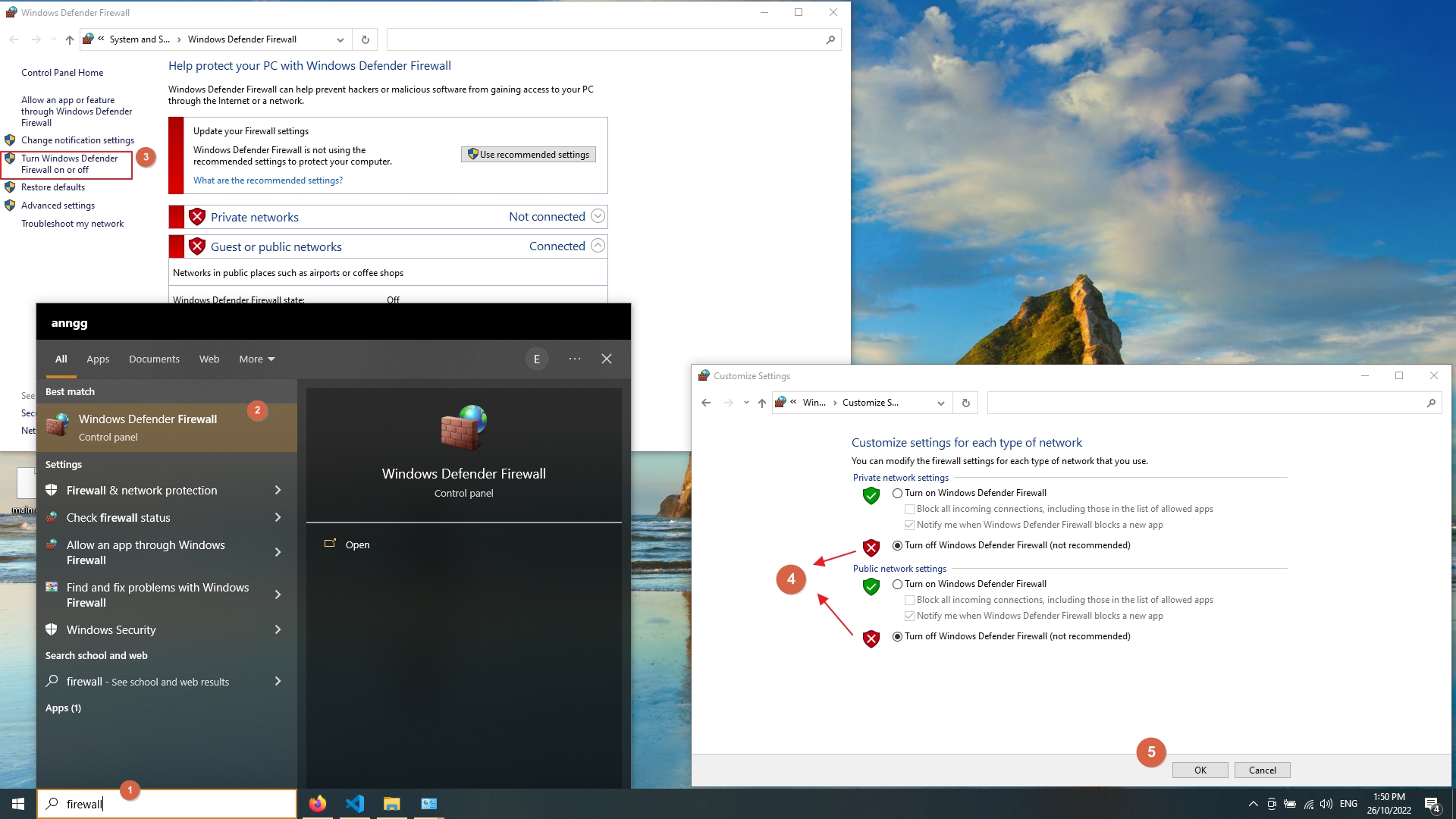
Temporarily disable Windows Defender Firewall to test whether the local firewall causes the
!A error. Re-enable the firewall after testing.
4. Contact the network administrator
Traceroute's
!A error at a remote hop indicates a firewall or ACL rule on equipment outside local control. Contact the network administrator responsible for the router at that hop to request an exception for diagnostic traffic, or confirm that the filtering is intentional.
How to Verify the Fix
Run traceroute to the same destination after applying the fix. Traceroute should display round-trip times at the previously blocked hop instead of the
!A code:
traceroute example.comA successful trace shows numeric round-trip times at every hop and reaches the destination on the final line.
Edge Cases and Variations
Traceroute shows
!A at every hop beyond a certain point.A border firewall rejects all probes that enter a specific network. Switching to TCP probes (
traceroute -T -p 443 example.com) sometimes bypasses these filters because firewalls often permit HTTPS traffic on port 443.
Traceroute shows
!A at one hop but reaches the destination.The filtering router rejects traceroute probes but forwards regular application traffic. This does not indicate a routing problem. The
!A response confirms the router is reachable but configured to deny diagnostic traffic.
Traceroute alternates between
!A and asterisks (
*) at the same hop.The firewall at that hop rate-limits ICMP responses. Some responses reach traceroute while others are dropped. This behavior does not affect actual data traffic.
Related Traceroute Errors
Traceroute: !N (Network unreachable)— occurs when no route exists to the destination network, which produces ICMP Type 3, Code 0. Unlike
!A, the
!N error indicates a routing table issue rather than an intentional block.
Traceroute: !P (Incompatible protocol)— occurs when the destination host does not support the transport protocol used by the probe, producing ICMP Type 3, Code 2. The
!P error points to a protocol mismatch rather than a firewall rule.