
Traceroute command snippets
Copy-paste-ready traceroute command snippets for common network diagnostic tasks on Linux, macOS, and Windows.
- Run a Basic Traceroute on Linux or macOS
- Run a Basic Traceroute on Windows with tracert
- Limit Maximum Hops with Traceroute on Linux
- Limit Maximum Hops with tracert on Windows
- Skip DNS Resolution with Traceroute
- Skip DNS Resolution with tracert on Windows
- Use ICMP Probes with Traceroute on Linux
- Use TCP Probes with Traceroute on Linux
- Send One Probe per Hop with Traceroute
- Trace an IPv6 Route on Linux or macOS
- Trace an IPv6 Route on Windows
- Set a Custom Timeout with Traceroute
Copy-paste-ready traceroute and tracert command snippets for common network diagnostic tasks.
Run a Basic Traceroute on Linux or macOS
Traceroute sends UDP probes to a destination host and displays each hop along the network path:
traceroute example.comRun a Basic Traceroute on Windows with tracert
Windows tracert sends ICMP Echo Request probes to a destination and displays each hop along the path:
tracert example.comLimit Maximum Hops with Traceroute on Linux
Traceroute stops probing after the specified TTL value. Set the maximum hop count to 5 with the
-m flag:
traceroute -m 5 example.com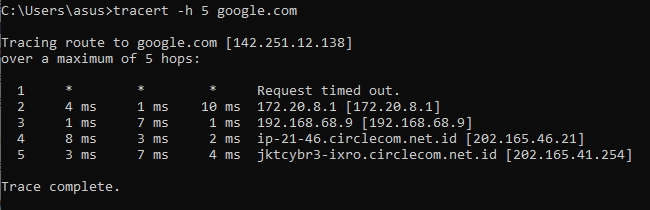
Limit Maximum Hops with tracert on Windows
Windows tracert limits the hop count with the
-h flag. Set the maximum to 5 hops:
tracert -h 5 example.comSkip DNS Resolution with Traceroute
Traceroute displays numeric IP addresses without performing reverse DNS lookups when the
-n flag is used:
traceroute -n example.comSkip DNS Resolution with tracert on Windows
Windows tracert skips hostname resolution with the
-d flag, which produces faster output:
tracert -d example.comUse ICMP Probes with Traceroute on Linux
Traceroute on Linux sends ICMP Echo Request probes instead of UDP when the
-I flag is used. This requires root privileges:
sudo traceroute -I example.comUse TCP Probes with Traceroute on Linux
Traceroute on Linux sends TCP SYN probes to port 80 with the
-T flag. TCP probes can traverse firewalls that block UDP and ICMP:
sudo traceroute -T example.comSend One Probe per Hop with Traceroute
Traceroute sends a single probe per hop instead of the default three when the
-q 1 option is used. This reduces output and speeds up the trace:
traceroute -q 1 example.comTrace an IPv6 Route on Linux or macOS
Traceroute traces IPv6 network paths with the
traceroute6 command:
traceroute6 example.comTrace an IPv6 Route on Windows
Windows tracert forces IPv6 probes with the
-6 flag:
tracert -6 example.comSet a Custom Timeout with Traceroute
Traceroute waits 2 seconds per probe instead of the default 5 seconds when the
-w flag is used:
traceroute -w 2 example.com