
Rsync command snippets
Copy-paste-ready Rsync commands for common file transfer, synchronization, and backup tasks on Linux and macOS.
- Pull a Remote Directory to the Local Machine with Rsync
- Push a Local Directory to a Remote Machine with Rsync
- Specify a Non-Standard SSH Port with Rsync
- Resume an Interrupted Rsync Transfer
- Exclude Files from an Rsync Transfer
- Rsync with .gitignore Rules
- Show Transfer Progress with Rsync
- Delete Source Files After Rsync Transfer
- Mirror a Directory with Rsync (Delete Extra Files)
- Limit Rsync Transfer Bandwidth
- Create an Incremental Snapshot Backup with Rsync
- Dry Run to Preview Rsync Transfer
Copy-paste-ready Rsync commands for common file transfer and synchronization tasks.
Pull a Remote Directory to the Local Machine with Rsync
Rsync copies a directory from a remote server to the local machine over SSH. This operation pulls the remote content to the local destination.
rsync -avz user@203.0.113.10:/home/user/remote_directory/ /home/user/local_directory/Push a Local Directory to a Remote Machine with Rsync
Rsync copies a local directory to a remote server over SSH. This operation pushes the local content to the remote destination.
rsync -avz /home/user/local_directory/ user@203.0.113.10:/home/user/remote_directory/Specify a Non-Standard SSH Port with Rsync
Rsync connects to a remote server on a custom SSH port using the
-e flag. Replace
2222 with the target port number.
rsync -avz -e "ssh -p 2222" /home/user/local_directory/ user@203.0.113.10:/home/user/remote_directory/Resume an Interrupted Rsync Transfer
Rsync resumes a partially completed transfer using the
-P flag, which combines
--partial and
--progress. Rsync keeps the partial file and continues from where it stopped.
rsync -avP /home/user/source_directory/ /home/user/destination_directory/Exclude Files from an Rsync Transfer
Rsync skips files matching a pattern when the
--exclude flag is set. This example excludes all
.log files and the
.git directory.
rsync -av --exclude='*.log' --exclude='.git' /home/user/source_directory/ /home/user/destination_directory/Rsync with .gitignore Rules
Rsync respects
.gitignore patterns when the
--filter flag reads them. This command excludes the
.git directory and any files listed in
.gitignore.
rsync -av --filter=":- .gitignore" --exclude=".git" /home/user/source_directory/ /home/user/destination_directory/Show Transfer Progress with Rsync
Rsync displays per-file transfer progress using the
--progress flag. The
--info=progress2 variant shows overall transfer progress instead of per-file output.
rsync -av --progress /home/user/source_directory/ /home/user/destination_directory/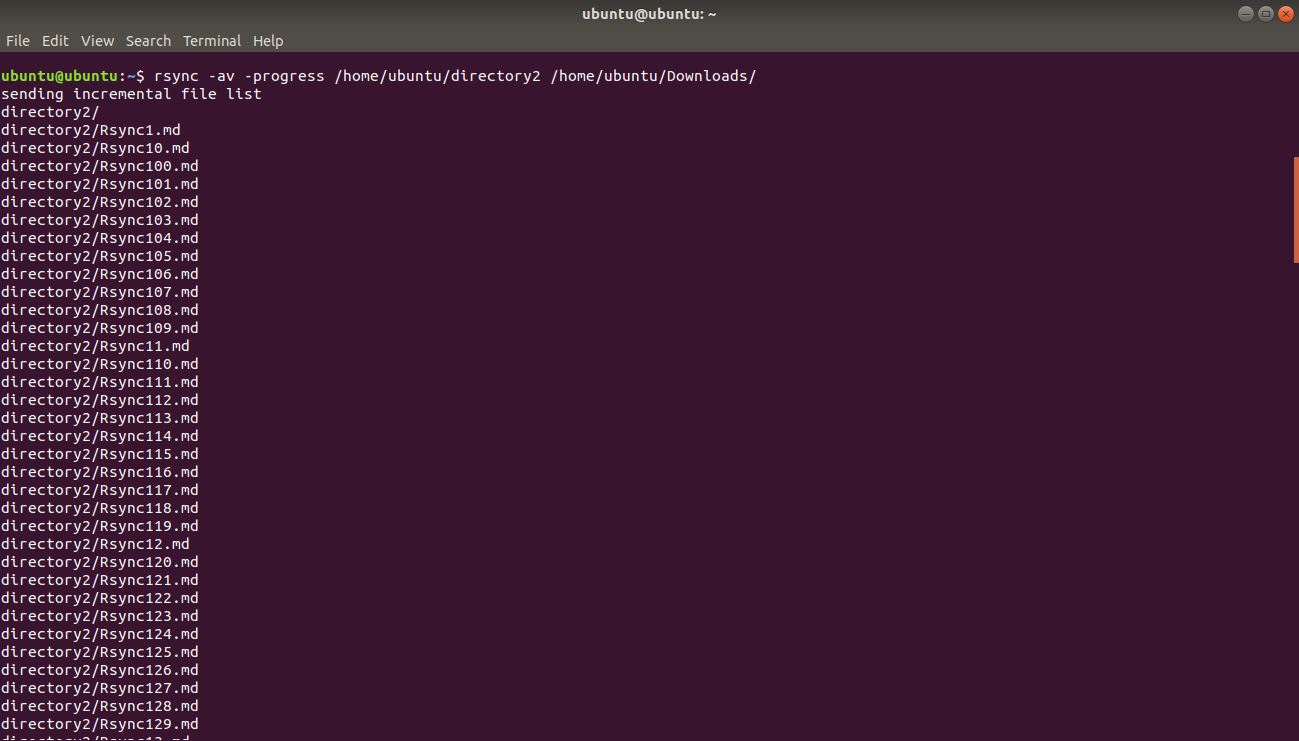
Rsync displays overall transfer statistics with
--info=progress2.
rsync -av --info=progress2 /home/user/source_directory/ /home/user/destination_directory/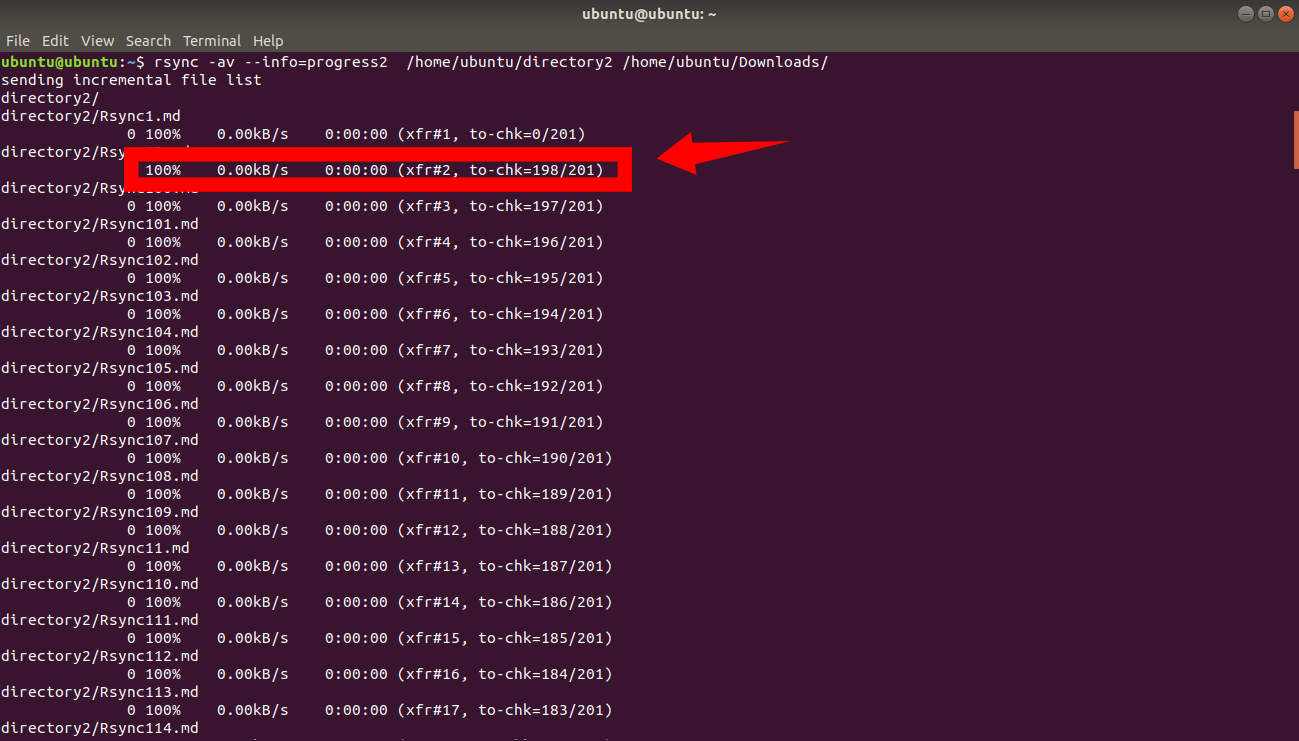
Delete Source Files After Rsync Transfer
Rsync removes source files after a completed transfer using the
--remove-source-files flag. This effectively moves files instead of copying them.
rsync -av --remove-source-files /home/user/source_directory/archive.zip /home/user/destination_directory/Mirror a Directory with Rsync (Delete Extra Files)
Rsync creates an exact mirror of the source at the destination using the
--delete flag. Rsync removes files from the destination that do not exist in the source.
rsync -av --delete /home/user/source_directory/ /home/user/destination_directory/Limit Rsync Transfer Bandwidth
Rsync throttles the transfer speed to the specified rate in kilobytes per second using the
--bwlimit flag. This example limits bandwidth to 1000 KB/s.
rsync -avz --bwlimit=1000 /home/user/source_directory/ user@203.0.113.10:/home/user/destination_directory/Create an Incremental Snapshot Backup with Rsync
Rsync creates space-efficient incremental backups using
--link-dest. Rsync hard-links unchanged files to the previous backup directory instead of copying them.
rsync -a --link-dest=/backup/2026-03-07 /home/user/data/ /backup/2026-03-08/Dry Run to Preview Rsync Transfer
Rsync simulates the transfer without writing any files using the
--dry-run flag. Run this before every destructive operation to verify expected behavior.
rsync -avn --delete /home/user/source_directory/ /home/user/destination_directory/