
phpMyAdmin tutorial: build a student information system
Build a normalized student information system with phpMyAdmin, covering database creation, table design, foreign key constraints, ALTER TABLE modifications, sample data, and JOIN queries.
- What You Will Need
- Step 1: Create the Student Database in phpMyAdmin
- Step 2: Create the Admin Table in phpMyAdmin
- Step 3: Create the Stream Table in phpMyAdmin
- Step 4: Create the State Table in phpMyAdmin
- Step 5: Create the City Table in phpMyAdmin
- Step 6: Create the Student Information Table in phpMyAdmin
- Step 7: Add a Missing Column with ALTER TABLE in phpMyAdmin
- Step 8: Create Foreign Key Relationships in phpMyAdmin Designer
- Create the City-to-State Relationship in phpMyAdmin
- Create the Student-to-City, Student-to-State, and Student-to-Stream Relationships
- Step 9: Populate the Database with Sample Data in phpMyAdmin
- Insert State Data
- Insert City Data Linked to States
- Insert Academic Stream Data
- Insert an Administrator Account
- Insert Student Records
- Step 10: Query and Test the Student Database in phpMyAdmin
- Retrieve Students with City, State, and Stream Names
- Test Referential Integrity Constraints
- What You Learned
- What to Do Next
This tutorial walks through building a complete student information system database from scratch using phpMyAdmin. By the end, you will have a normalized relational database with five linked tables, foreign key constraints, cascading updates, and tested JOIN queries that retrieve related data across tables.
What You Will Need
- A running phpMyAdmin instance connected to MySQL 5.5+ or MariaDB 5.5+ with CREATE, ALTER, INSERT, SELECT, UPDATE, and DELETE privileges. See the phpMyAdmin installation tutorialfor setup instructions.
- XAMPP, Docker, or a Linux server with Apache and MySQL running. This tutorial uses XAMPP screenshots, but the SQL statements work on any MySQL/MariaDB server.
Step 1: Create the Student Database in phpMyAdmin
phpMyAdmin creates a new database by executing a CREATE DATABASE statement. This database will contain all tables for the student information system.
Start the MySQL service in the XAMPP Control Panel (or your preferred method). Click Adminnext to MySQL to open phpMyAdmin in the browser.
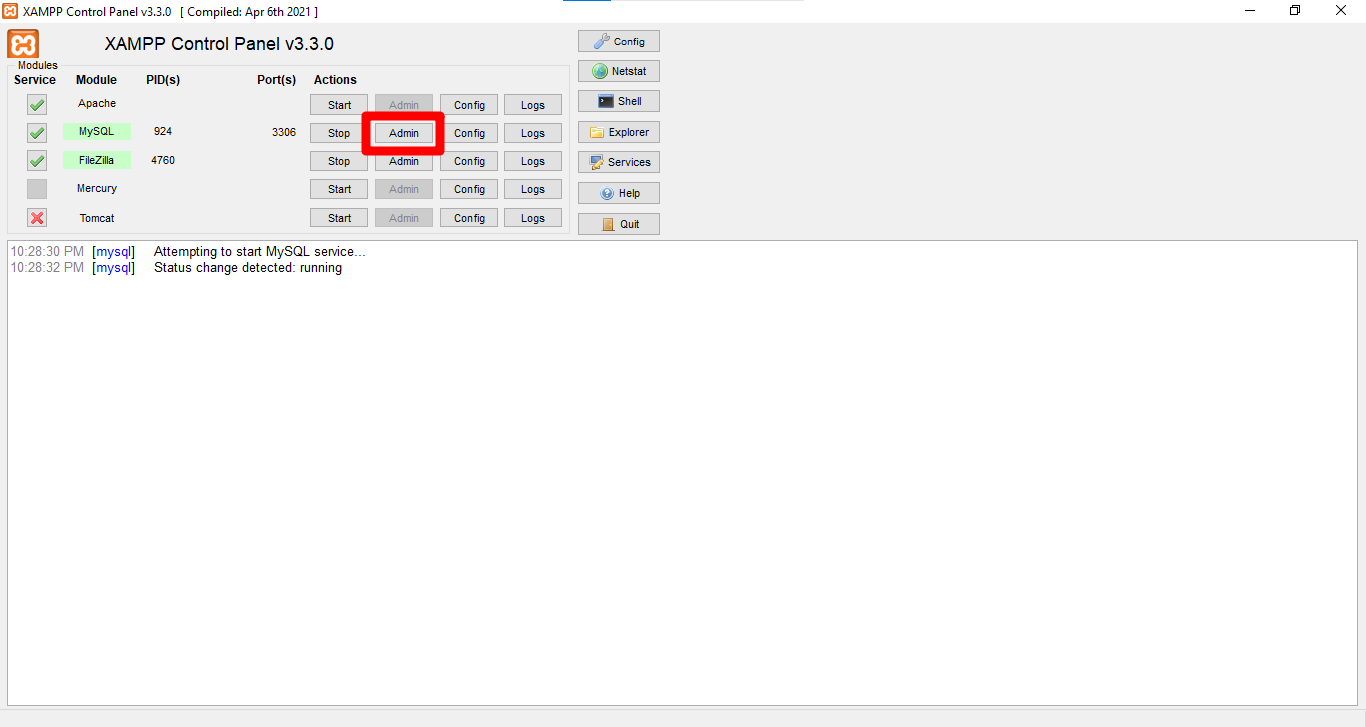 XAMPP Control Panel with MySQL service and Admin button
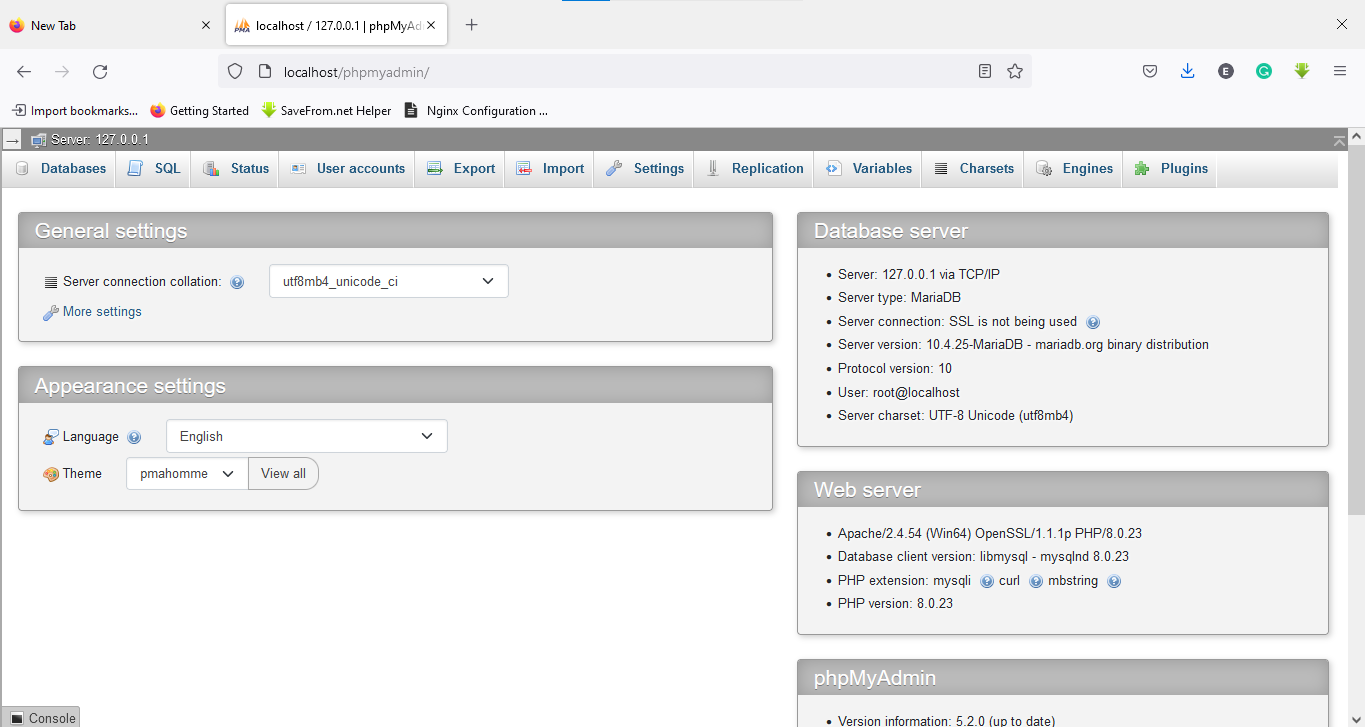 phpMyAdmin dashboard after successful login
Click the
Databasestab. Enter
students_information_database as the database name. Select
utf8mb4_unicode_ci from the collation dropdown. Click
Create.
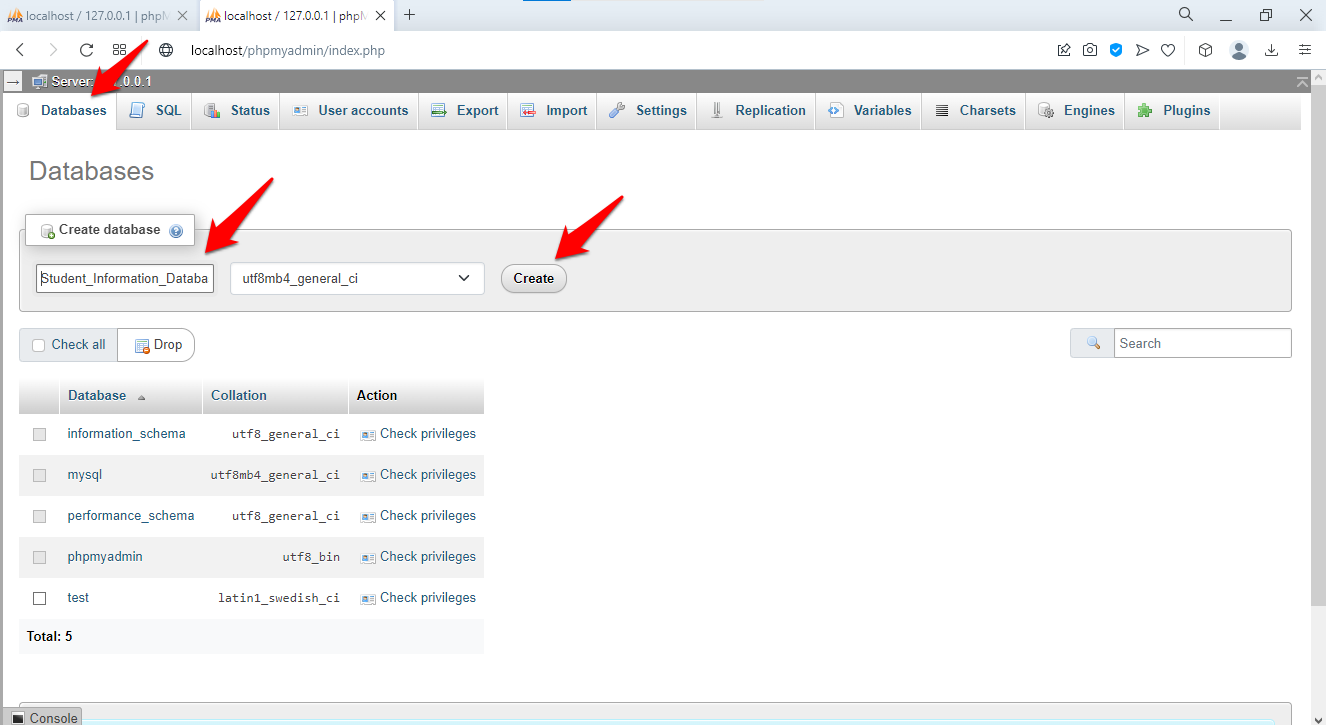 Database creation completed and selected
phpMyAdmin executes this SQL:
CREATE DATABASE students_information_database
CHARACTER SET utf8mb4
COLLATE utf8mb4_unicode_ci;
The
utf8mb4 character set stores international characters and emoji. The
unicode_ci collation provides case-insensitive comparisons for student names in multiple languages.
Step 2: Create the Admin Table in phpMyAdmin
phpMyAdmin stores administrator login credentials in a separate table. This table tracks who can access the student information system's administrative interface.
Select the
students_information_database from the left sidebar. Enter
admin as the table name with
3 columns. Click
Create.
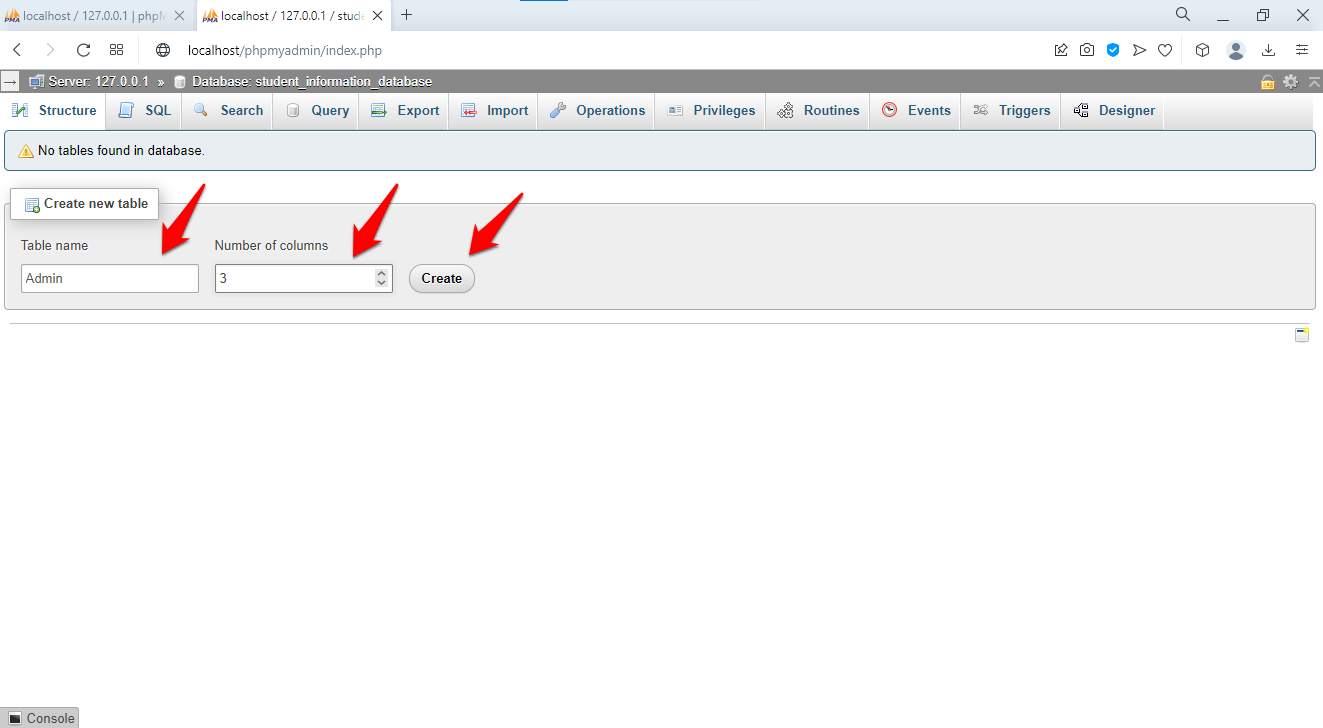 Admin table structure definition
Define the columns:
| Column | Type | Length | Attributes | Index | A_I |
|---|---|---|---|---|---|
id | INT | 11 | UNSIGNED | PRIMARY | Yes |
username | VARCHAR | 255 | UNIQUE | ||
password | CHAR | 32 |
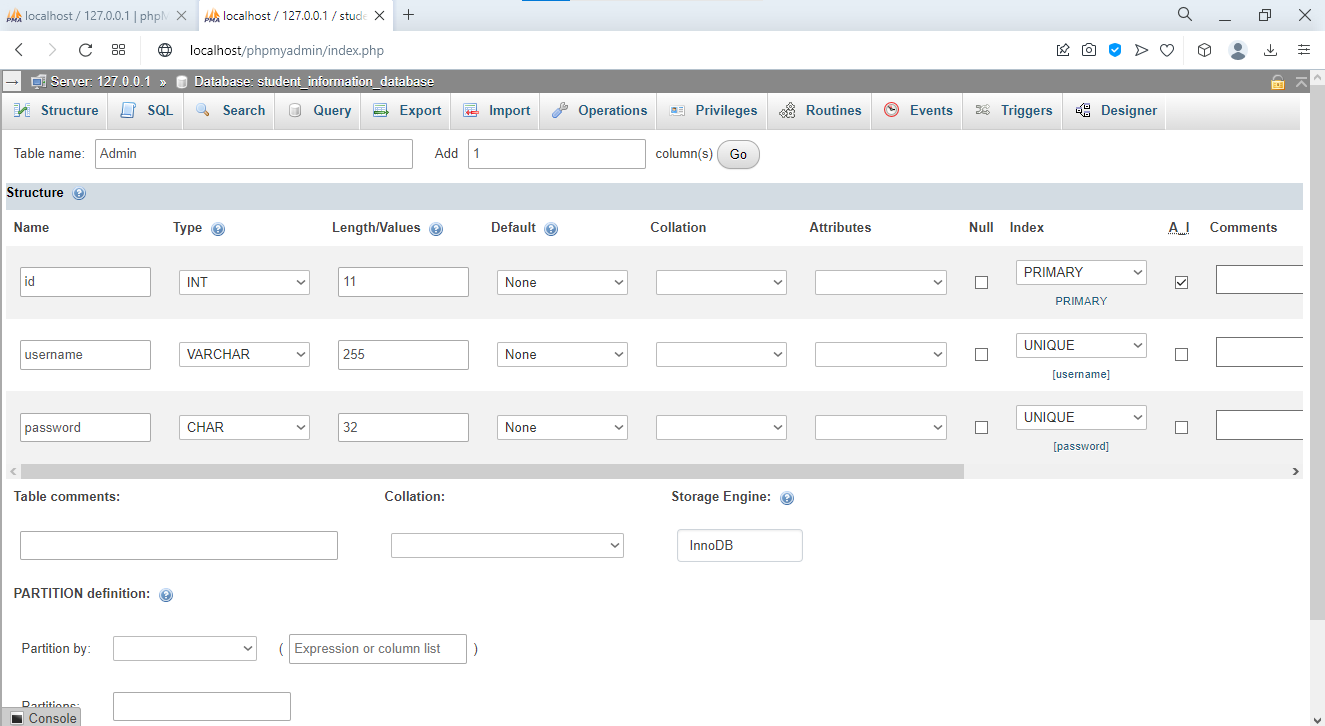 Detailed column settings for admin table
The
UNSIGNED attribute on
id doubles the maximum integer range by disallowing negative values. The
UNIQUE constraint on
username prevents duplicate administrator accounts. The
CHAR(32) type stores fixed-length MD5 hashes. In production, use
CHAR(60) or longer for bcrypt or Argon2 password hashes, which provide stronger protection against brute-force attacks.
phpMyAdmin generates this SQL:
CREATE TABLE admin (
    id INT(11) UNSIGNED NOT NULL AUTO_INCREMENT,
    username VARCHAR(255) NOT NULL UNIQUE,
    password CHAR(32) NOT NULL,
    PRIMARY KEY (id)
) ENGINE=InnoDB DEFAULT CHARSET=utf8mb4 COLLATE=utf8mb4_unicode_ci;
Step 3: Create the Stream Table in phpMyAdmin
phpMyAdmin stores academic streams (Science, Commerce, Arts) and grade levels in a lookup table. Separating stream data into its own table avoids repeating stream names across every student row. This normalization pattern reduces data redundancy and ensures stream names stay consistent.
Click the database name in the left sidebar. Enter
main_stream as the table name with
2 columns. Click
Create.
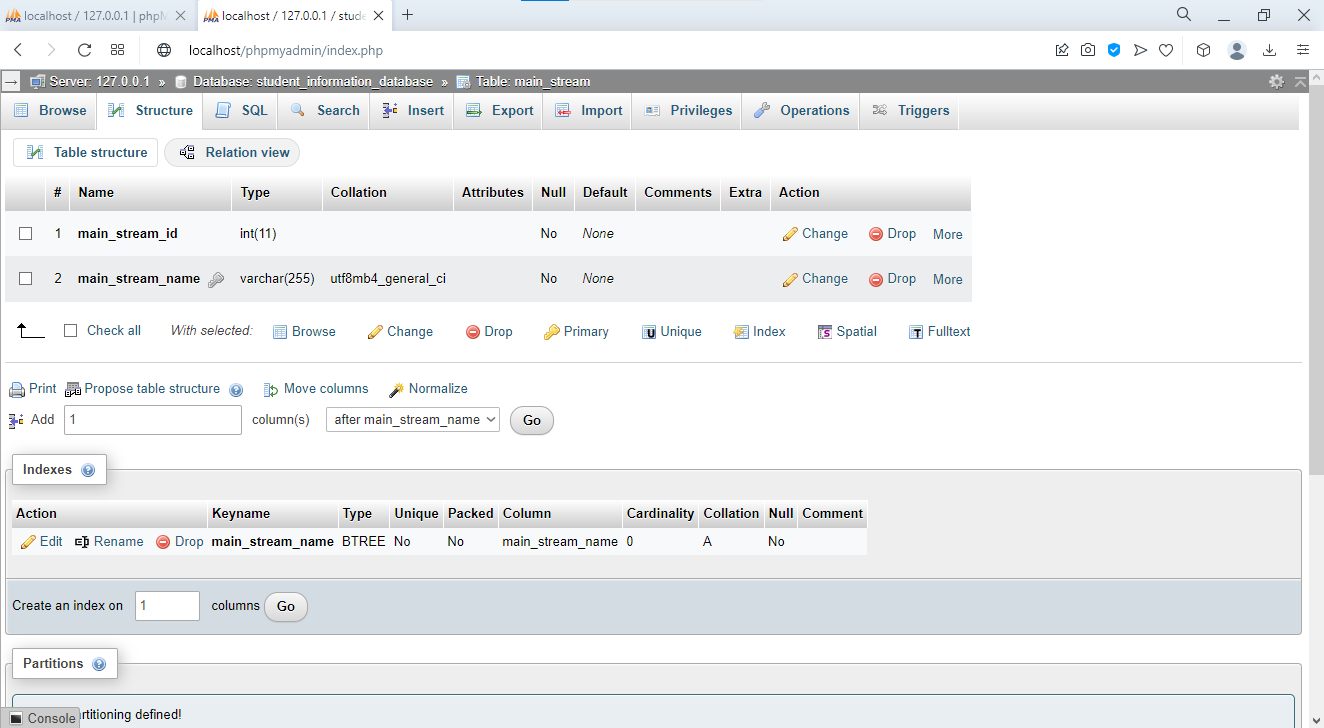 Main stream table structure with grade level column
Define the initial columns:
| Column | Type | Length | Index |
|---|---|---|---|
main_stream_id | INT | 11 | PRIMARY, A_I |
main_stream_name | VARCHAR | 255 | INDEX |
phpMyAdmin generates this SQL:
CREATE TABLE main_stream (
    main_stream_id INT(11) NOT NULL AUTO_INCREMENT,
    main_stream_name VARCHAR(255) NOT NULL,
    PRIMARY KEY (main_stream_id),
    INDEX idx_stream_name (main_stream_name)
) ENGINE=InnoDB;
The
main_stream_gradelevel column is intentionally omitted. Step 8 demonstrates adding it with ALTER TABLE to practice modifying existing tables.
Step 4: Create the State Table in phpMyAdmin
phpMyAdmin stores state and province names in a dedicated lookup table. Student records reference state IDs through foreign keys instead of storing state name strings directly. This prevents inconsistencies such as "California", "CA", and "Calif." appearing as separate values.
Create a table named
main_state with
2 columns:
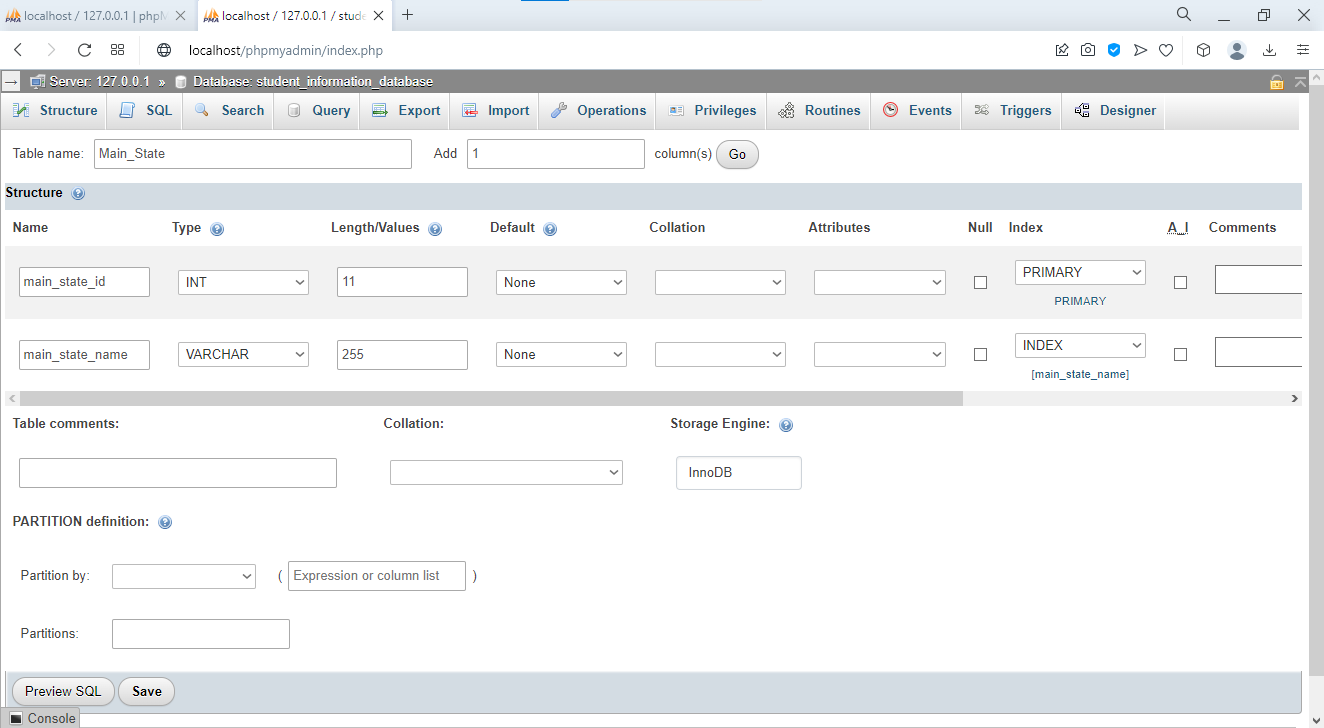 State table structure configuration
| Column | Type | Length | Index |
|---|---|---|---|
main_state_id | INT | 11 | PRIMARY, A_I |
main_state_name | VARCHAR | 255 | INDEX |
CREATE TABLE main_state (
    main_state_id INT(11) NOT NULL AUTO_INCREMENT,
    main_state_name VARCHAR(255) NOT NULL,
    PRIMARY KEY (main_state_id),
    INDEX idx_state_name (main_state_name)
) ENGINE=InnoDB;
Step 5: Create the City Table in phpMyAdmin
phpMyAdmin stores city names in a table that references the state table through a foreign key. Each city belongs to exactly one state, which creates a one-to-many relationship: one state contains many cities.
Create a table named
main_city with
3 columns:
 City table with foreign key reference to state
| Column | Type | Length | Index |
|---|---|---|---|
main_city_id | INT | 11 | PRIMARY, A_I |
main_city_state_id | INT | 11 | INDEX (Foreign Key) |
main_city_name | VARCHAR | 255 | INDEX |
CREATE TABLE main_city (
    main_city_id INT(11) NOT NULL AUTO_INCREMENT,
    main_city_state_id INT(11) NOT NULL,
    main_city_name VARCHAR(255) NOT NULL,
    PRIMARY KEY (main_city_id),
    INDEX idx_city_name (main_city_name),
    INDEX idx_state_id (main_city_state_id),
    CONSTRAINT fk_city_state FOREIGN KEY (main_city_state_id)
        REFERENCES main_state(main_state_id)
        ON DELETE RESTRICT
        ON UPDATE CASCADE
) ENGINE=InnoDB;
The
ON DELETE RESTRICT constraint prevents deleting a state that has cities assigned to it. MySQL returns an error instead of leaving orphaned city records. The
ON UPDATE CASCADE constraint automatically updates city records when a state ID changes, which maintains referential integrity.
Step 6: Create the Student Information Table in phpMyAdmin
phpMyAdmin stores student profiles in a table with 15 columns covering personal details, parent contact information, and foreign key references to city, state, and stream lookup tables.
Create a table named
main_students_information with
15 columns:
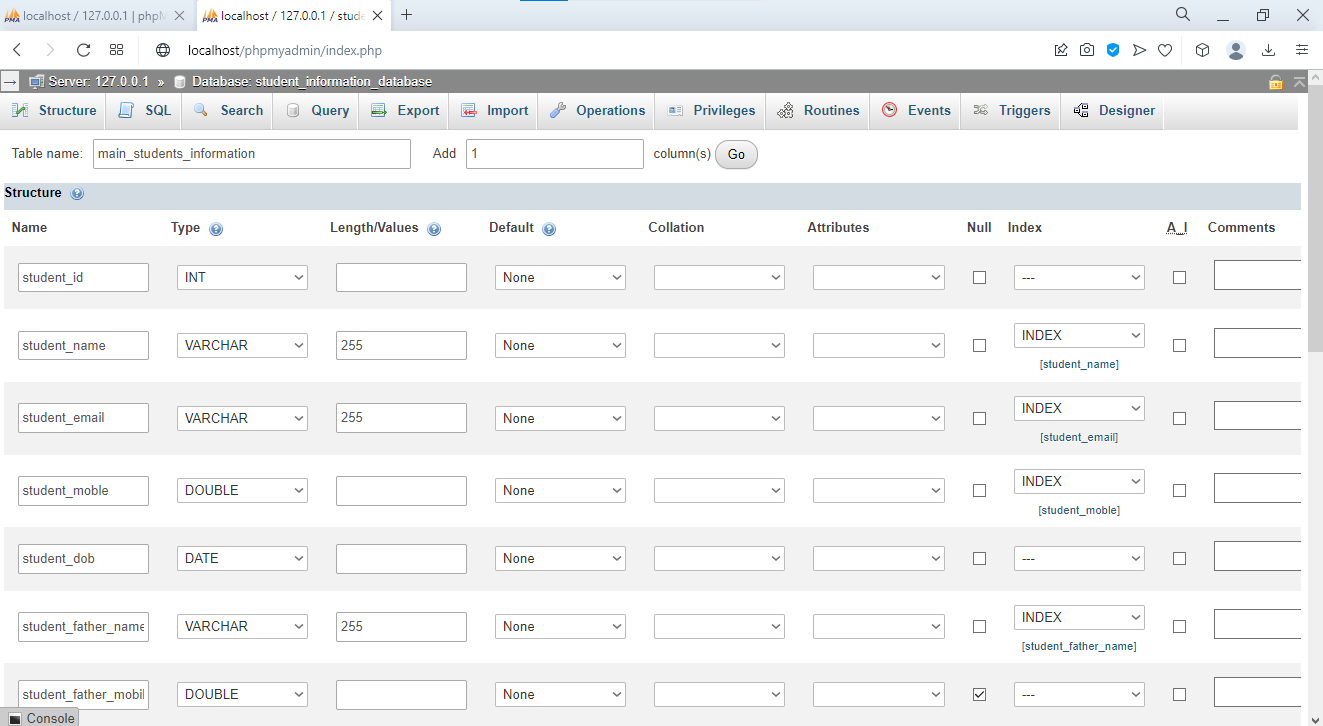 Comprehensive student information table structure
| Column | Type | Length | Null | Index | A_I |
|---|---|---|---|---|---|
student_id | INT | 11 | No | PRIMARY | Yes |
student_name | VARCHAR | 255 | No | INDEX | |
student_email | VARCHAR | 255 | No | UNIQUE | |
student_mobile | BIGINT | 20 | No | ||
student_dob | DATE | No | |||
student_father_name | VARCHAR | 255 | Yes | ||
student_father_mobile | BIGINT | 20 | Yes | ||
student_mother_name | VARCHAR | 255 | Yes | ||
student_mother_mobile | BIGINT | 20 | Yes | ||
student_city_id | INT | 11 | No | INDEX | |
student_state_id | INT | 11 | No | INDEX | |
student_address | TEXT | Yes | |||
student_stream_id | INT | 11 | No | INDEX | |
student_doa | DATE | No | |||
student_picture | VARCHAR | 255 | Yes |
The parent contact columns (
student_father_name,
student_mother_name) accept NULL values because some students may not have both parents on record. The BIGINT type stores phone numbers with international dialing codes that exceed INT's maximum value. The
student_doa column stores the Date of Admission.
CREATE TABLE main_students_information (
    student_id INT(11) NOT NULL AUTO_INCREMENT,
    student_name VARCHAR(255) NOT NULL,
    student_email VARCHAR(255) NOT NULL UNIQUE,
    student_mobile BIGINT(20) NOT NULL,
    student_dob DATE NOT NULL,
    student_father_name VARCHAR(255),
    student_father_mobile BIGINT(20),
    student_mother_name VARCHAR(255),
    student_mother_mobile BIGINT(20),
    student_city_id INT(11) NOT NULL,
    student_state_id INT(11) NOT NULL,
    student_address TEXT,
    student_stream_id INT(11) NOT NULL,
    student_doa DATE NOT NULL,
    student_picture VARCHAR(255),
    PRIMARY KEY (student_id),
    INDEX idx_name (student_name),
    INDEX idx_email (student_email),
    INDEX idx_city (student_city_id),
    INDEX idx_state (student_state_id),
    INDEX idx_stream (student_stream_id)
) ENGINE=InnoDB;
Step 7: Add a Missing Column with ALTER TABLE in phpMyAdmin
phpMyAdmin modifies existing table structures through the Structure tab. The
main_stream table from Step 3 is missing a
main_stream_gradelevel column. Adding it now demonstrates the ALTER TABLE workflow.
Select the
main_stream table from the left sidebar. Click the
Structuretab.
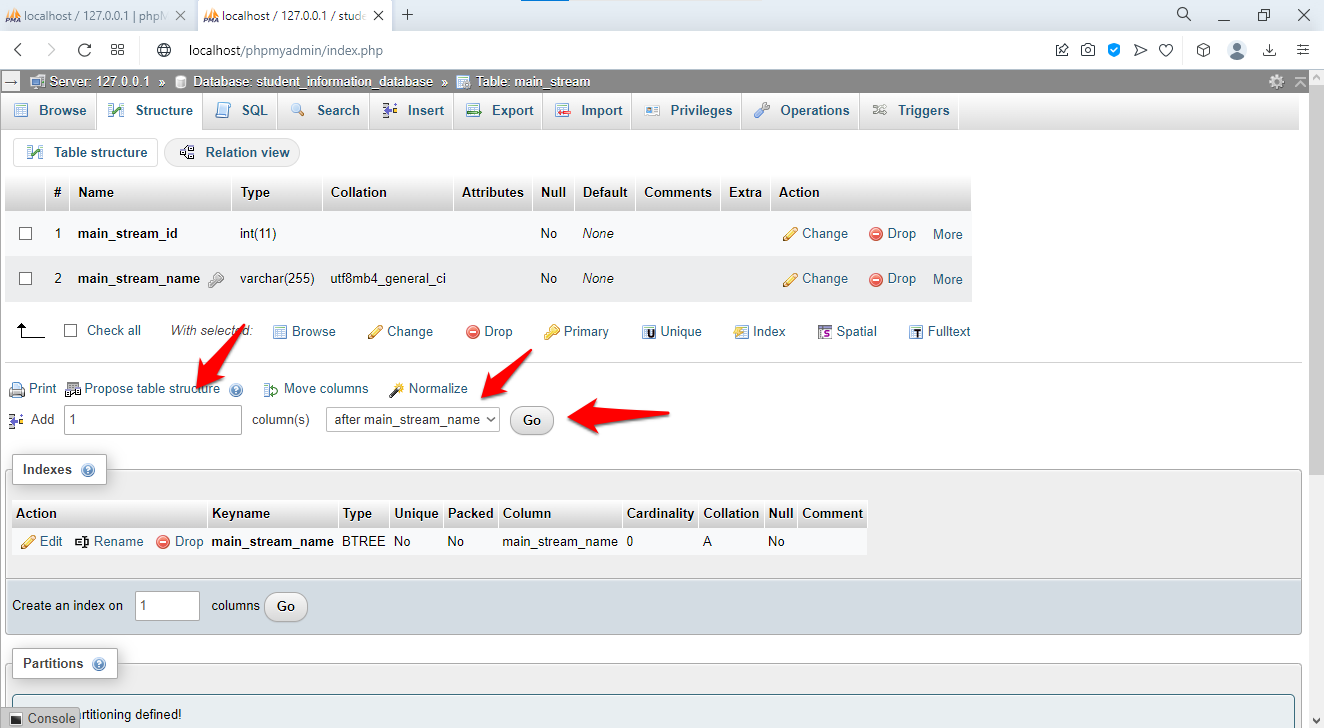 Structure view showing existing columns and options
In the "Add column(s)" section, enter
1. Select
After
main_stream_name. Click
Go.
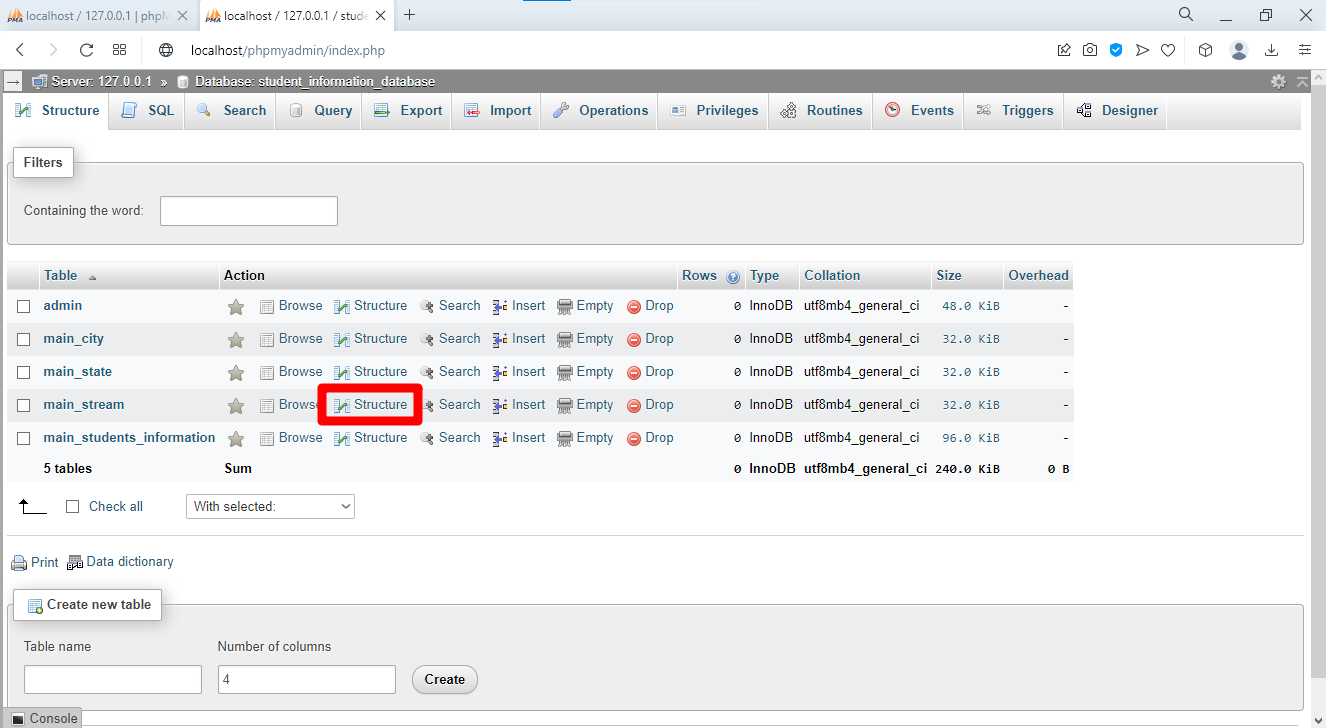 Adding column after specific existing column
Define the new column:
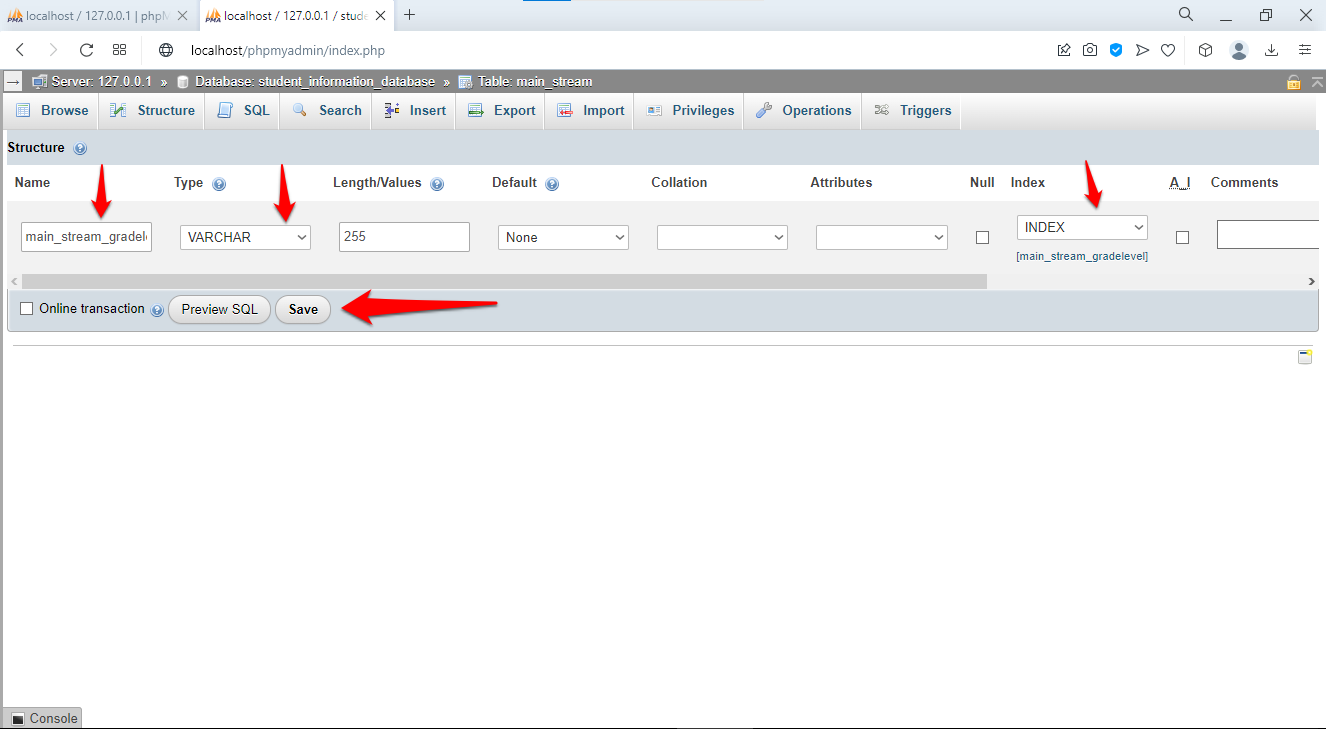 Column definition form for new grade level field
| Setting | Value |
|---|---|
| Name | main_stream_gradelevel |
| Type | VARCHAR |
| Length | 50 |
| Index | INDEX |
Click Save. phpMyAdmin executes these ALTER TABLE statements:
ALTER TABLE main_stream
ADD COLUMN main_stream_gradelevel VARCHAR(50) NOT NULL
AFTER main_stream_name;

ALTER TABLE main_stream
ADD INDEX idx_gradelevel (main_stream_gradelevel);
ALTER TABLE adds, modifies, or drops columns on a live table without deleting existing data. phpMyAdmin preserves all existing rows when adding a new column. The new column fills with the default value (empty string for NOT NULL VARCHAR) for all existing rows.
Step 8: Create Foreign Key Relationships in phpMyAdmin Designer
phpMyAdmin's Designer view displays tables as draggable boxes and draws lines between related columns. Foreign key constraints ensure every student's
student_city_id points to a valid city, every city's
main_city_state_id points to a valid state, and every student's
student_stream_id points to a valid stream.
Click the Designertab in the top navigation. phpMyAdmin displays all tables in the database.
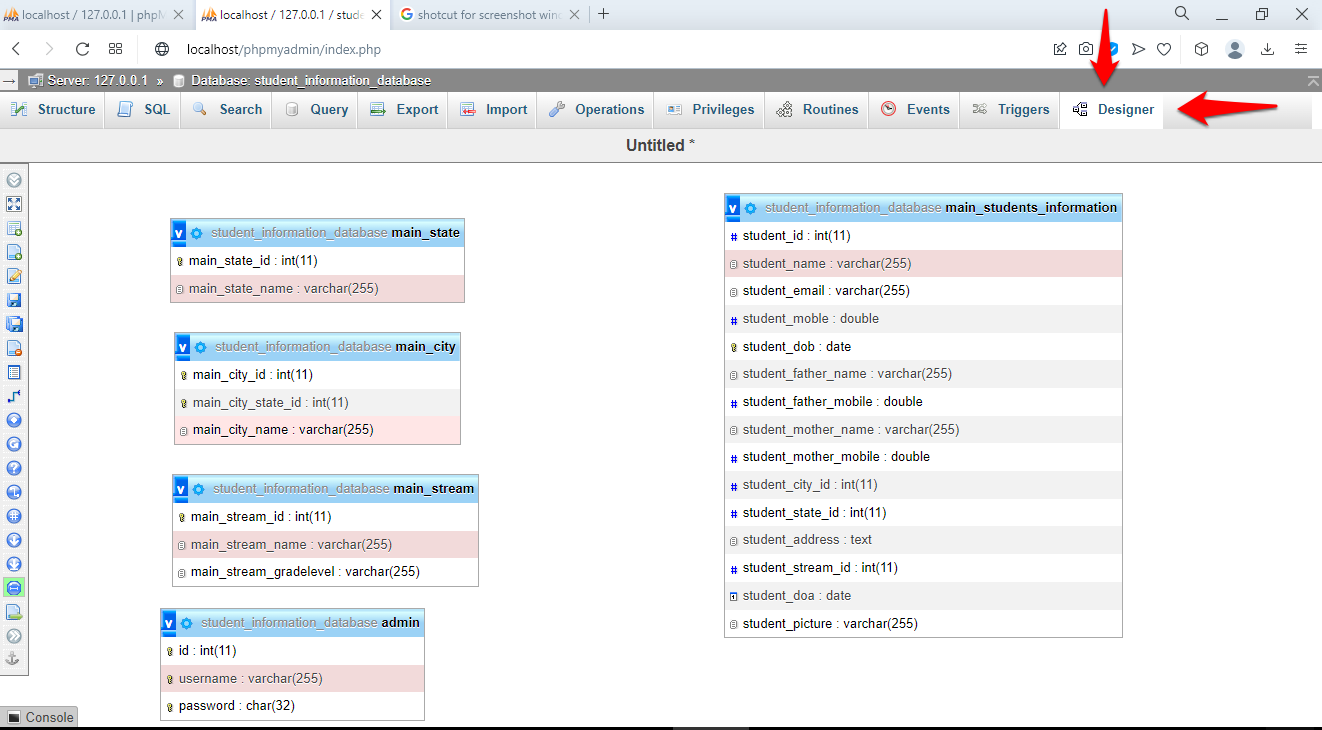 Designer view showing all database tables
Create the City-to-State Relationship in phpMyAdmin
Click the Create relationbutton in the left toolbar.
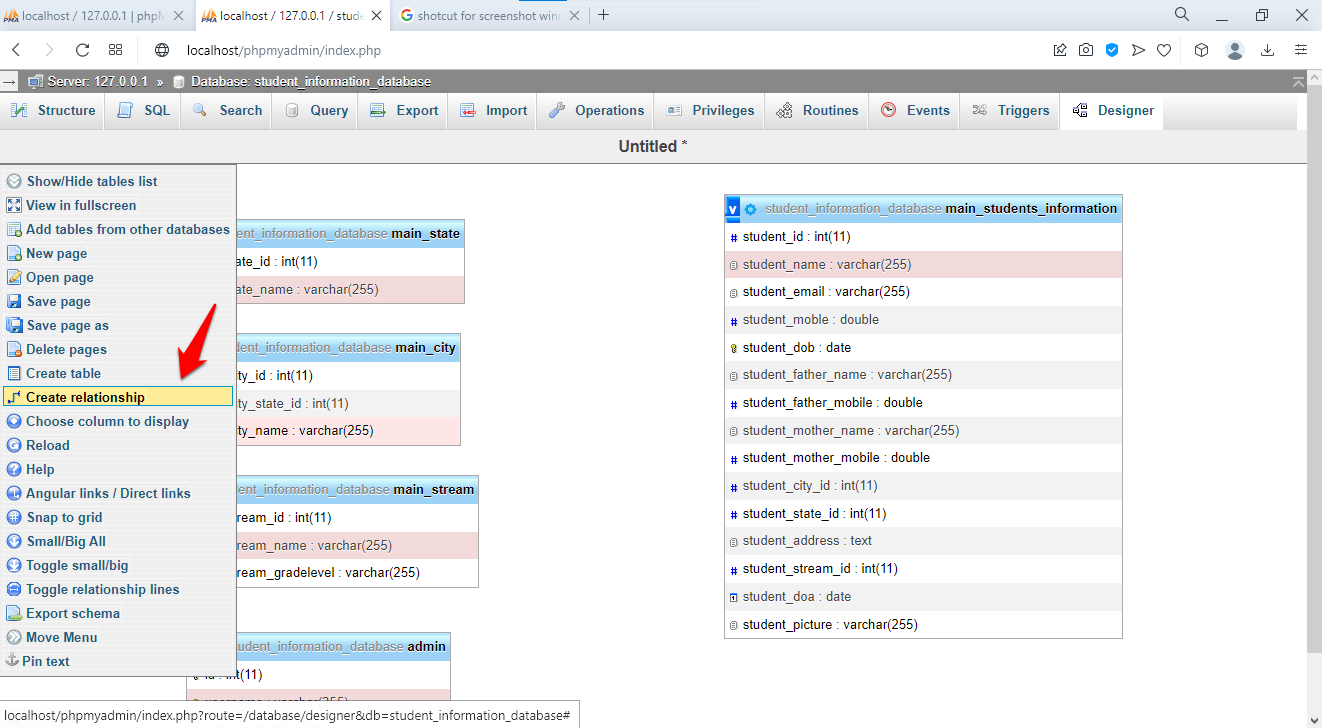 Create relation tool activated
Drag from
main_city.main_city_state_id and drop on
main_state.main_state_id.
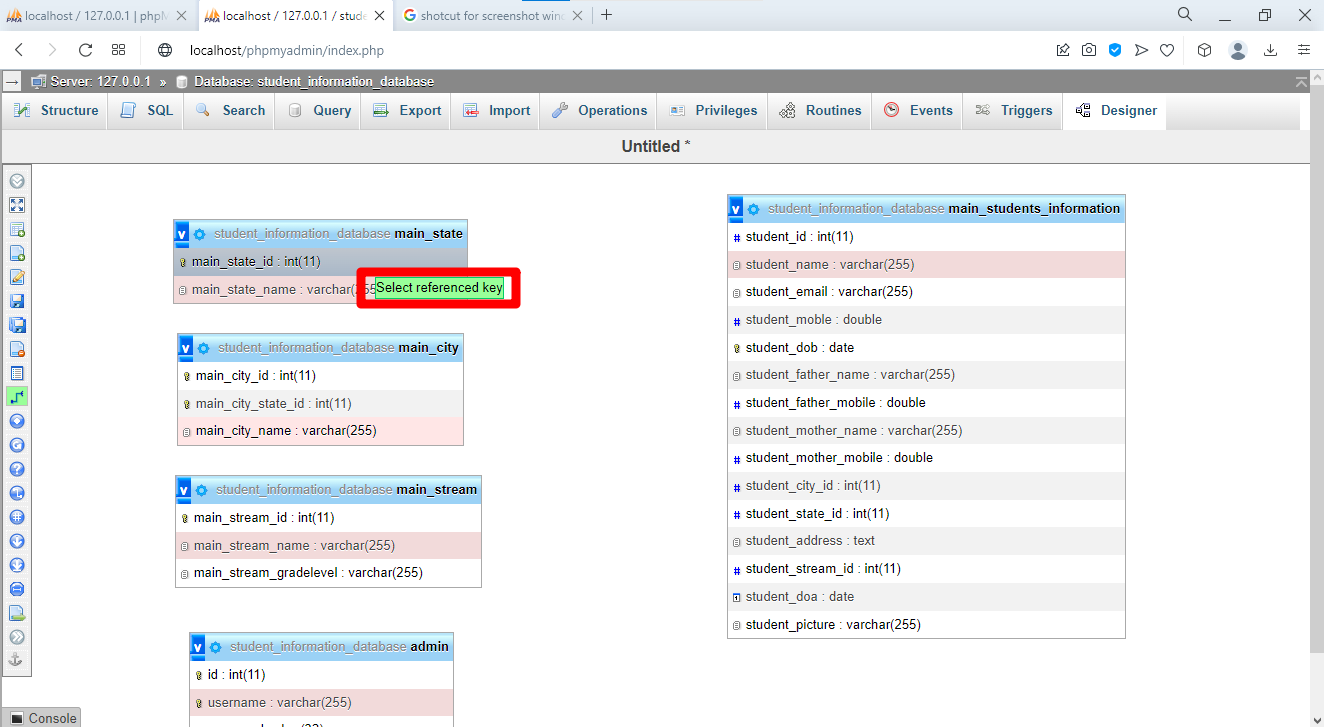 Selecting foreign key for relationship creation
Configure the constraint behavior:
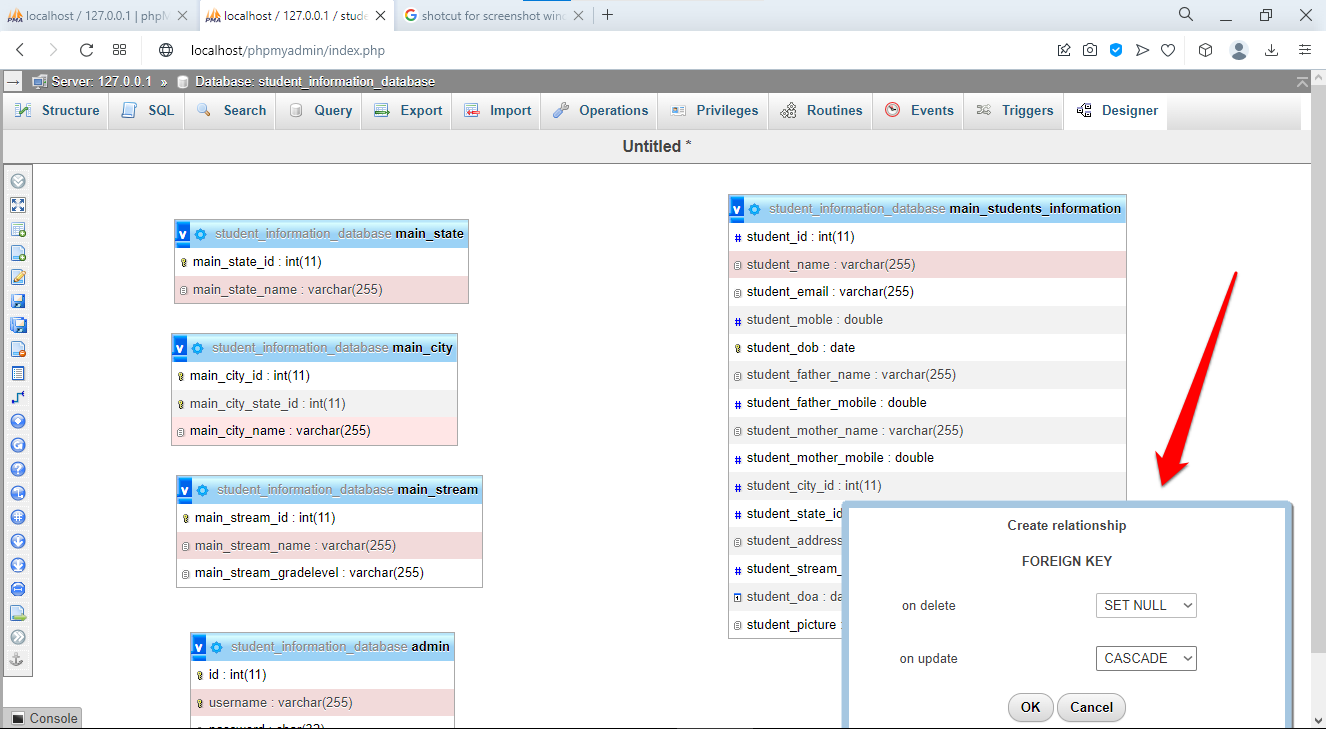 Foreign key constraint configuration dialog
Set ON DELETE to RESTRICT(prevent deleting a state that has cities). Set ON UPDATE to CASCADE(update city references when a state ID changes). Click Save.
Create the Student-to-City, Student-to-State, and Student-to-Stream Relationships
phpMyAdmin's SQL tab accepts multiple ALTER TABLE statements. Create the remaining three foreign key constraints:
ALTER TABLE main_students_information
ADD CONSTRAINT fk_student_city
FOREIGN KEY (student_city_id)
REFERENCES main_city(main_city_id)
ON DELETE RESTRICT
ON UPDATE CASCADE;

ALTER TABLE main_students_information
ADD CONSTRAINT fk_student_state
FOREIGN KEY (student_state_id)
REFERENCES main_state(main_state_id)
ON DELETE RESTRICT
ON UPDATE CASCADE;

ALTER TABLE main_students_information
ADD CONSTRAINT fk_student_stream
FOREIGN KEY (student_stream_id)
REFERENCES main_stream(main_stream_id)
ON DELETE RESTRICT
ON UPDATE CASCADE;
Return to the Designer tab. phpMyAdmin displays connecting lines between related tables, indicating active foreign key constraints.
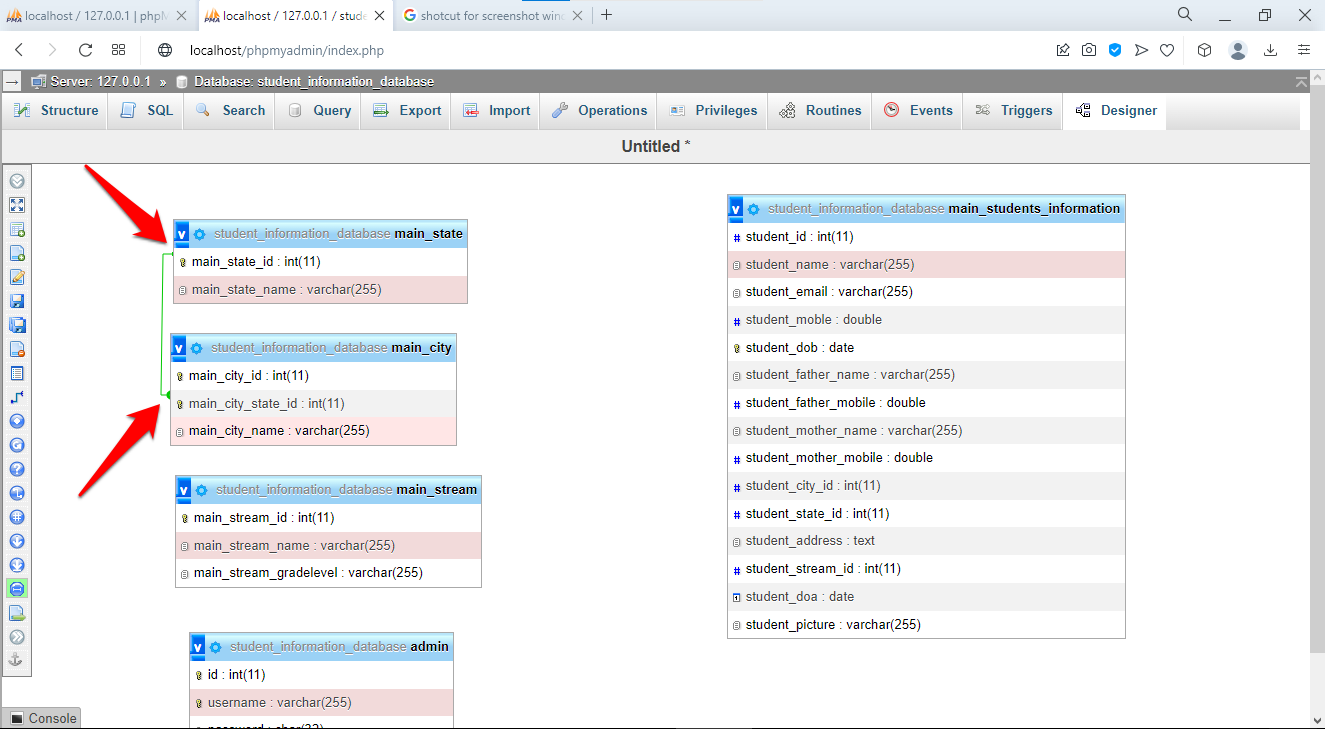 Visual representation showing all table relationships with connecting lines
Each line shows the parent table (referenced) and the child table (referencing). The constraint type (RESTRICT, CASCADE) controls what happens when a parent row is deleted or updated.
Step 9: Populate the Database with Sample Data in phpMyAdmin
phpMyAdmin's SQL tab accepts INSERT statements that populate tables with test data. Insert data into the parent tables (states, cities, streams) before the child table (students) because foreign key constraints require parent rows to exist first.
Insert State Data
INSERT INTO main_state (main_state_name) VALUES
('California'),
('New York'),
('Texas'),
('Florida'),
('Illinois');
Insert City Data Linked to States
INSERT INTO main_city (main_city_state_id, main_city_name) VALUES
(1, 'Los Angeles'),
(1, 'San Francisco'),
(1, 'San Diego'),
(2, 'New York City'),
(2, 'Buffalo'),
(3, 'Houston'),
(3, 'Dallas'),
(4, 'Miami'),
(4, 'Orlando'),
(5, 'Chicago');
Each
main_city_state_id value matches an existing
main_state_id in the state table. MySQL rejects any INSERT with a state ID that does not exist because of the foreign key constraint.
Insert Academic Stream Data
INSERT INTO main_stream (main_stream_name, main_stream_gradelevel) VALUES
('Science', 'Grade 10'),
('Science', 'Grade 11'),
('Science', 'Grade 12'),
('Commerce', 'Grade 10'),
('Commerce', 'Grade 11'),
('Arts', 'Grade 10'),
('Arts', 'Grade 11');
Insert an Administrator Account
-- WARNING: MD5 is insecure for password storage in production.
-- Use bcrypt or Argon2 in real applications.
INSERT INTO admin (username, password) VALUES
('admin', MD5('admin123'));
Insert Student Records
INSERT INTO main_students_information (
    student_name, student_email, student_mobile, student_dob,
    student_father_name, student_father_mobile,
    student_mother_name, student_mother_mobile,
    student_city_id, student_state_id, student_address,
    student_stream_id, student_doa
) VALUES
(
    'John Smith', 'john.smith@example.com', 5551234567, '2006-03-15',
    'Robert Smith', 5559876543,
    'Mary Smith', 5559876544,
    1, 1, '123 Main Street, Los Angeles, CA 90001',
    1, '2020-09-01'
),
(
    'Jane Doe', 'jane.doe@example.com', 5552345678, '2005-07-22',
    'James Doe', 5558765432,
    'Jennifer Doe', 5558765433,
    4, 2, '456 Broadway, New York City, NY 10001',
    2, '2019-09-01'
);
MySQL validates each INSERT against the foreign key constraints. The
student_city_id = 1 matches Los Angeles (city ID 1), and
student_state_id = 1 matches California (state ID 1). phpMyAdmin rejects any INSERT with a nonexistent city, state, or stream ID.
Step 10: Query and Test the Student Database in phpMyAdmin
phpMyAdmin's SQL tab executes SELECT queries with JOIN clauses to retrieve related data from multiple tables. JOIN queries replace foreign key IDs with human-readable names.
Retrieve Students with City, State, and Stream Names
SELECT
    s.student_name,
    s.student_email,
    c.main_city_name AS city,
    st.main_state_name AS state,
    str.main_stream_name AS stream,
    str.main_stream_gradelevel AS grade
FROM main_students_information s
JOIN main_city c ON s.student_city_id = c.main_city_id
JOIN main_state st ON s.student_state_id = st.main_state_id
JOIN main_stream str ON s.student_stream_id = str.main_stream_id;
phpMyAdmin displays a result table with student names, emails, and the resolved city, state, stream, and grade values. The JOIN clauses match each foreign key ID to its corresponding row in the lookup tables.
Test Referential Integrity Constraints
-- Attempt to delete a state that has cities (RESTRICT blocks this)
DELETE FROM main_state WHERE main_state_id = 1;
-- Error: Cannot delete or update a parent row: a foreign key constraint fails
MySQL returns an error because Los Angeles, San Francisco, and San Diego reference California (state ID 1). The ON DELETE RESTRICT constraint protects parent rows from deletion when child rows depend on them.
-- Update a state ID (CASCADE propagates this to cities)
UPDATE main_state SET main_state_id = 100 WHERE main_state_id = 5;
-- Success: Chicago's main_city_state_id automatically updates from 5 to 100
MySQL updates the city records automatically because the ON UPDATE CASCADE constraint propagates primary key changes to all referencing foreign key columns.
What You Learned
This tutorial built a normalized student information system with five tables in phpMyAdmin. The
main_state and
main_city tables demonstrate one-to-many relationships through foreign key constraints. The
main_students_information table references three lookup tables (
main_city,
main_state,
main_stream) to eliminate data redundancy. The ALTER TABLE statement added a missing column to an existing table without data loss. The JOIN query retrieved human-readable values from related tables using foreign key associations. The RESTRICT and CASCADE referential actions control how MySQL handles deletions and updates to parent rows.
What to Do Next
Learn how to export and import this database for backup and migration. See the phpMyAdmin database management tutorialfor export/import instructions.
Search across all tables for specific student records. See the phpMyAdmin advanced operations tutorialfor search techniques.
Apply security hardening before exposing phpMyAdmin on a network. See phpMyAdmin best practicesfor recommendations.