
How to add timestamps to rotated log filenames with Logrotate
Configure the Logrotate dateext and dateformat directives to append date stamps to rotated log file names instead of numeric suffixes.
Configure Logrotate to append date stamps to rotated log file names for easier identification and chronological sorting.
Prerequisites
- Linux system with Logrotate installed.
- Root or sudo access to edit files in
/etc/logrotate.d/. - An existing Logrotate configuration file for the target application.
Step-by-Step: Add Timestamps to Rotated Filenames with Logrotate
Open the Logrotate configuration file for the target application. This example uses Nginx:
sudo nano /etc/logrotate.d/nginxAdd the
dateextanddateformatdirectives inside the log file block. Logrotate appends a date suffix instead of a numeric counter (.1,.2,.3) to rotated filenames:/var/log/nginx/*.log { daily rotate 14 compress dateext dateformat -%Y%m%d extension .log missingok notifempty }Logrotate renames rotated files using the date format. With this configuration,
access.logbecomesaccess-20260308.logafter rotation.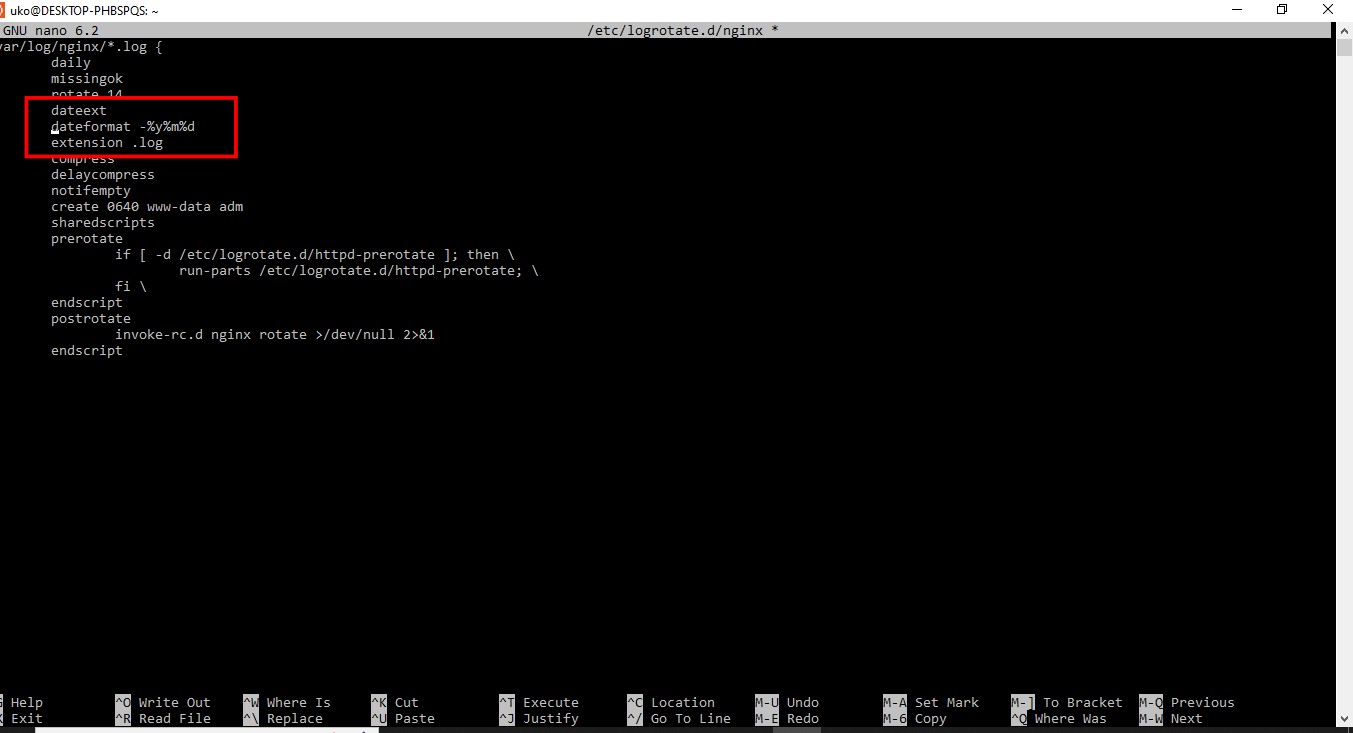
The
dateformatdirective uses strftime format specifiers:Specifier Meaning Example %YFour-digit year 2026%mTwo-digit month 03%dTwo-digit day 08%sUnix timestamp 1773187200The
extensiondirective preserves the.logfile extension. Logrotate places the date stamp before the extension:access-20260308.log.Save the configuration file and exit the editor.
Test the updated Logrotate configuration in debug mode:
sudo logrotate -d /etc/logrotate.d/nginxLogrotate displays the renamed filenames with date stamps in the debug output.
How to Verify Timestamps Appear in Rotated Filenames
Force a rotation and list the log directory:
sudo logrotate -f /etc/logrotate.d/nginx
ls -la /var/log/nginx/
Logrotate creates rotated files with date-stamped names such as
access-20260308.log.gz.
Common Issues When Adding Timestamps to Log Filenames with Logrotate
Logrotate reports "destination already exists."The
dateext directive generates one filename per day. If Logrotate runs multiple times in the same day, the second run fails because the target filename already exists. Use
dateformat -%Y%m%d-%s to include a Unix timestamp for uniqueness.
The date format produces unexpected filenames.Verify the
dateformat string uses valid strftime specifiers. Note that
%m is months and
%M is minutes. Using
%M instead of
%m produces minute-based suffixes instead of monthly ones.
The file extension appears in the wrong position.Without the
extension directive, Logrotate appends the date stamp after the full filename:
access.log-20260308. Add
extension .log to place the date before the extension:
access-20260308.log.
For a full reference of all Logrotate directives, see the Logrotate directives reference.