
ipconfig: IPv4 address is missing or shows 0.0.0.0
Fix missing IPv4 address in ipconfig output on Windows by verifying DHCP assignment, releasing and renewing the IP lease, and checking physical connections.
ipconfig shows no IPv4 address or displays
0.0.0.0when the network adapter did not receive an IP address from the Dynamic Host Configuration Protocol (DHCP) server.
When ipconfig Shows a Missing IP Address
ipconfig displays no IPv4 address or shows
0.0.0.0 when running
ipconfig or
ipconfig /all and the DHCP server did not assign an address to the network adapter. The computer cannot connect to the local network or the internet without a valid IP address assignment.
ipconfig may also show a
169.254.x.x address instead of the expected private network address. This Automatic Private IP Addressing (APIPA) range indicates that Windows could not reach the DHCP server and assigned a self-configured link-local address as a fallback.
What Causes the Missing IP Address in ipconfig
ipconfig shows no IP address when the DHCP server on the router is unreachable. The network adapter sends a DHCPDISCOVER broadcast message during startup or renewal, and the DHCP server must respond with an IP address lease. When the DHCP server does not respond, the adapter remains without an IPv4 address.
ipconfig also shows a missing IP address when the physical network connection is faulty. A disconnected Ethernet cable, a damaged network port, or a failed switch between the computer and the router prevents the DHCP handshake from completing. For wired LAN connections, verify that all physical connections between the computer, switches, and router are secure.
How to Fix the Missing IP Address in ipconfig
Verify the network adapter uses automatic IP assignment. Open Windows Network Adapter Properties and confirm that "Obtain an IP address automatically" is selected. Adapters set to manual static IP assignment do not communicate with the DHCP server.
Check the physical network connection. For wired Ethernet, verify the cable is plugged in at both ends and the link light on the network port is active. For Wi-Fi, verify the adapter is enabled and connected to the correct wireless network.
Open Windows Command Prompt. Type
cmdin the Windows search bar and select the Command Prompt app.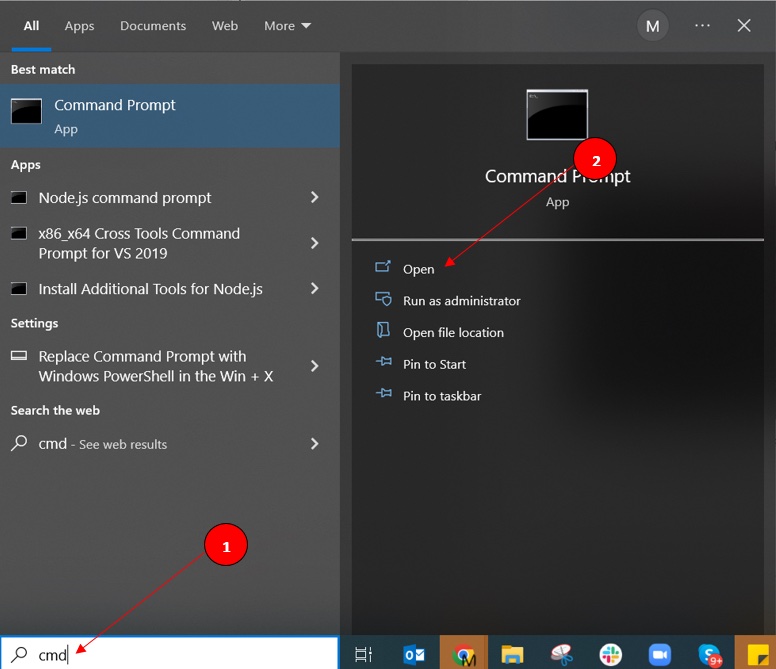
Run
ipconfig /releaseto clear the current DHCP lease state. This command resets the adapter's IP configuration.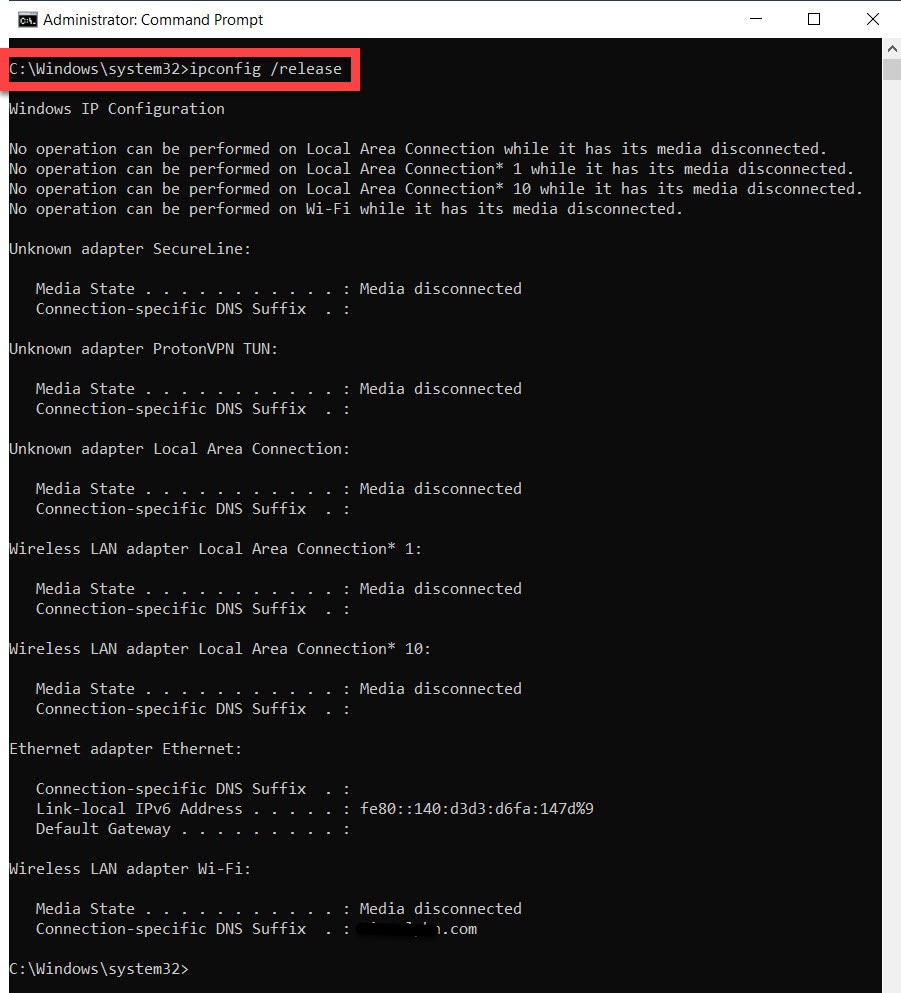
Run
ipconfig /renewto request a new IP address lease from the DHCP server. The DHCP server responds with an available IP address from its address pool.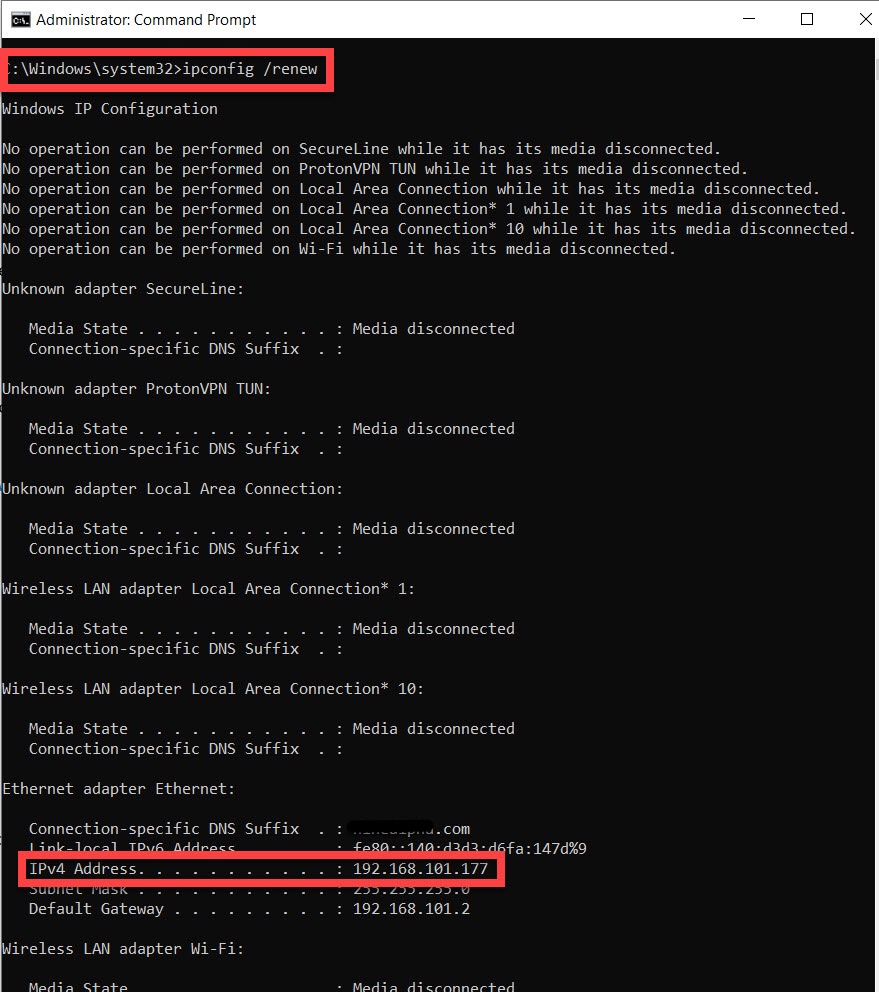
Check the IPv4 Addressfield in the ipconfig output to confirm an address was assigned.
How to Verify the Fix
Run
ipconfig after the renewal completes. The
IPv4 Addressfield should display an address in the expected private network range (such as
192.168.x.x or
10.x.x.x). Test connectivity by pinging the default gateway address shown in the ipconfig output. A successful ping confirms the network adapter has a working IP address and can reach the router.
Edge Cases and Variations
ipconfig may show a
169.254.x.x APIPA address when the DHCP server's address pool is full. The DHCP server has no remaining addresses to assign. Restart the router to clear expired leases, or expand the DHCP address range in the router's configuration.
ipconfig shows no IP address on disabled network adapters. Open Device Manager, expand "Network adapters", and verify the adapter is enabled. Right-click the adapter and select "Enable device" if it shows a disabled icon.
ipconfig may fail to obtain an IP address when a third-party firewall blocks DHCP traffic on UDP ports 67 and 68. Temporarily disable the firewall to test DHCP communication.
Related ipconfig Errors
- ipconfig: Unable to contact your DHCP server-- the DHCP server is unreachable, which is the most common cause of a missing IP address.
- ipconfig: Default gateway is blank or missing-- often occurs alongside a missing IP address when the DHCP lease fails completely.
- ipconfig: The operation failed as no adapter is in the state permissible for this operation-- the adapter cannot process DHCP commands due to its current state.