
ipconfig: Default gateway is blank or missing
Fix the missing default gateway in ipconfig output on Windows by switching to automatic DHCP assignment or configuring the gateway manually.
ipconfig shows an empty default gateway field when the DHCP server did not provide a gateway address or when the network adapter uses a static IP configuration without a gateway defined.
When ipconfig Shows a Missing Default Gateway
ipconfig displays a blank
Default Gatewayfield when running
ipconfig or
ipconfig /all and the network adapter has no gateway address assigned. Without a default gateway, the computer can communicate with devices on the local network segment but cannot reach external networks or the internet.
ipconfig also shows a missing default gateway when the adapter uses a manually assigned static IP address and the administrator did not enter a gateway address. Static IP configurations require manual entry of the default gateway, subnet mask, and DNS server addresses.
What Causes the Missing Default Gateway in ipconfig
ipconfig reports a blank default gateway when the DHCP server on the router fails to include the gateway address in the DHCP lease response. This occurs when the router's DHCP configuration is incomplete or when the DHCP lease was only partially assigned due to a network interruption during the DHCP handshake.
ipconfig also displays no default gateway when the network adapter is configured for manual static IP assignment and the gateway field was left empty. Windows does not auto-populate the default gateway for static configurations -- the administrator must enter it explicitly in the Network Adapter Properties dialog.
How to Fix the Missing Default Gateway in ipconfig
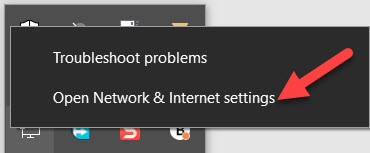
Open the Windows Network & Internet Settings. Right-click the network icon in the bottom-right corner of the taskbar and select "Open Network & Internet settings".
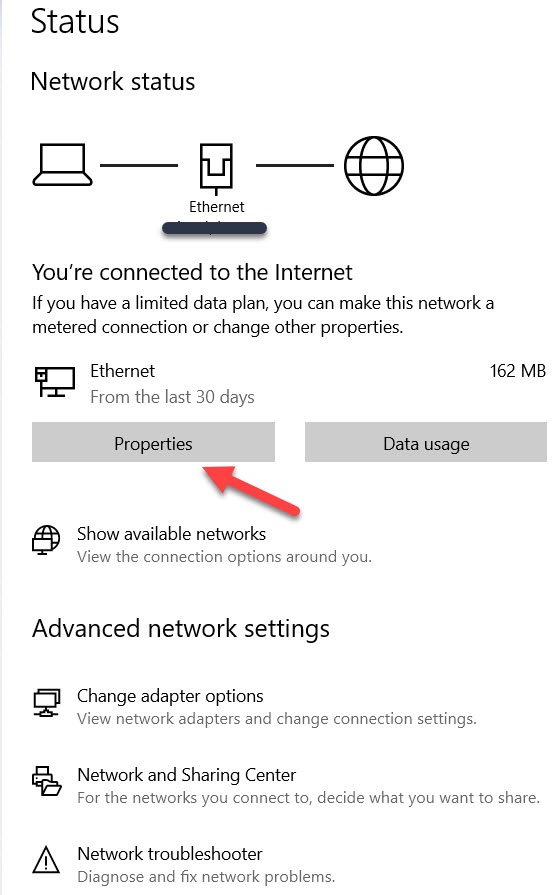
Click "Properties" under the active network connection to view the adapter configuration.
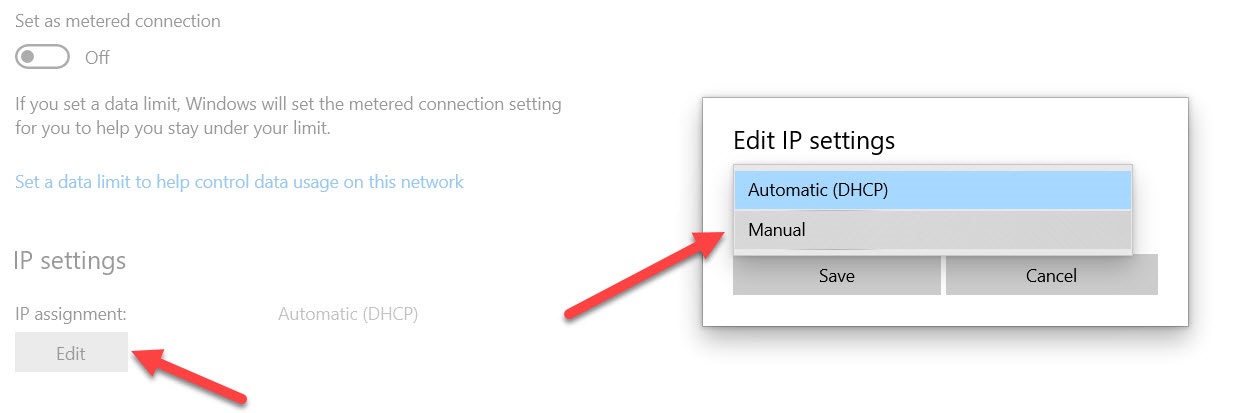
Check the IP assignmentstatus. If the assignment shows "Manual", change it to "Automatic (DHCP)". The DHCP server on the router provides the default gateway address automatically as part of the IP address lease.
Run
ipconfig /releasefollowed byipconfig /renewin Windows Command Prompt to request a new DHCP lease that includes the default gateway address.ipconfig /release ipconfig /renew
How to Verify the Fix
Run
ipconfig in Windows Command Prompt after changing the IP assignment to automatic. The
Default Gatewayfield should display the router's IP address (commonly
192.168.1.1 or
192.168.0.1). Test internet connectivity by pinging an external address such as
ping 8.8.8.8 to confirm the gateway routes traffic correctly.
Edge Cases and Variations
ipconfig may show a missing default gateway on VPN virtual adapters. VPN connections often use a separate routing table that does not assign a default gateway to the virtual adapter. This is expected behavior and does not indicate a problem.
ipconfig displays a blank gateway when the Ethernet cable is connected to a switch or hub that is not connected to a router. The switch provides layer-2 network connectivity but does not run a DHCP server or provide gateway routing. Connect the switch to a router to enable DHCP and default gateway assignment.
Related ipconfig Errors
- ipconfig: missing IP address-- the DHCP server did not assign an IP address, which also results in a missing default gateway.
- ipconfig: Unable to contact your DHCP server-- the DHCP server is unreachable, preventing both IP address and gateway assignment.
- ipconfig: The operation failed as no adapter is in the state permissible for this operation-- the adapter state prevents DHCP lease renewal.