
How to parse ipconfig output with PHP
Parse ipconfig output into key-value pairs using a PHP script that extracts network configuration data from the command-line output.
ipconfig output can be parsed programmatically using PHP to extract network configuration values. This approach converts the colon-delimited key-value format of ipconfig into structured data for automation or reporting.
Prerequisites
- Windows operating system with ipconfig available in Windows Command Prompt.
- PHP installed on the system (PHP 7.0 or later).
- ipconfig output captured in a string variable (via
shell_exec('ipconfig /all')or from a text file).
Step-by-Step: Parse ipconfig Output with PHP
Capture the ipconfig output. Run
ipconfig /alland store the result in a variable, or read it from a saved text file.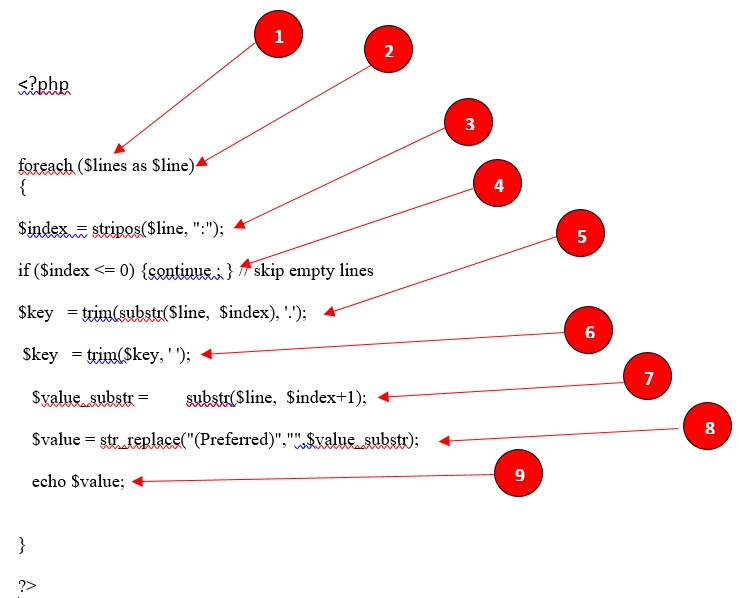
Use this PHP script to parse ipconfig output into key-value pairs. The script iterates through each line, splits on the colon delimiter, and extracts the field name and value.
<?php
foreach ($lines as $line)
{
    $index = stripos($line, ":");
    if ($index <= 0) { continue; } // skip empty lines
    $key = trim(substr($line, 0, $index), '. ');
    $value_substr = substr($line, $index + 1);
    $value = str_replace("(Preferred)", "", $value_substr);
    $value = trim($value);
    echo "$key: $value\n";
}
?>
The PHP script processes each line of ipconfig output as follows:
- The
$linesvariable contains all lines of ipconfig output as an array of strings. - The
stripos()function finds the position of the colon (:) delimiter in each line. - Lines without a colon are skipped because they are section headers or blank lines.
- The
substr()function splits each line at the colon to extract the field name (key) and value. - The
trim()function removes leading dots and whitespace from the field name. - The
str_replace()function removes the "(Preferred)" suffix that ipconfig appends to the active IP address.
- The
How to Verify the Parsed Output
Run the PHP script and compare the extracted values against the raw ipconfig output. Each key-value pair should match a line from the original
ipconfig /all output. Verify that fields such as "IPv4 Address", "Subnet Mask", and "Default Gateway" appear with their correct values.
Common Issues When Parsing ipconfig Output
- Missing fields in output:Some ipconfig fields span multiple lines or use inconsistent formatting. Lines without a colon delimiter are skipped by this script. Adapt the parsing logic for multiline values such as DNS Suffix Search List entries.
- Character encoding issues:ipconfig output on non-English Windows systems may use different character encodings. Set the PHP script's encoding to match the system locale.
- "(Preferred)" suffix not removed:Verify the
str_replace()call matches the exact suffix text. Some Windows versions or locales use different text for this marker.