
How to Look Up a Domain by IP Address with dig
Perform a reverse DNS lookup with dig using the -x flag to find the domain name associated with an IP address.
Perform a reverse DNS lookup with Domain Information Groper (dig) to find the domain name associated with an IP address.
Prerequisites
- A Linux, macOS, or Windows (WSL) system with terminal access.
- The
digcommand installed. On Debian/Ubuntu, install it withsudo apt install dnsutils. On RHEL/CentOS/Fedora, install it withsudo dnf install bind-utils. - An active internet connection to reach DNS servers.
- The IP address to look up. Both IPv4 and IPv6 addresses are supported.
Step-by-Step: Reverse DNS Lookup with dig
- Open a terminal and run dig with the
-xflag followed by the IP address. dig converts the IP address to a PTR record query in thein-addr.arpazone and returns the associated domain name:
dig -x 199.43.135.53dig displays the PTR record in the ANSWER section, mapping the IP address to its domain name.
;; QUESTION SECTION:
;53.135.43.199.in-addr.arpa.    IN      PTR

;; ANSWER SECTION:
53.135.43.199.in-addr.arpa. 28800 IN    PTR     a.iana-servers.net.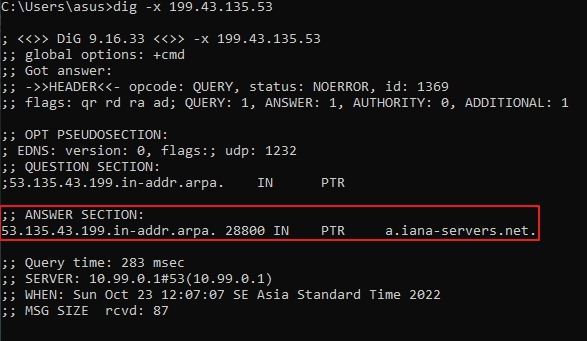
- Add
+shortto display the domain name without metadata. dig returns the PTR record value on a single line:
dig -x 199.43.135.53 +short
a.iana-servers.net.- Perform a reverse lookup for an IPv6 address. dig converts the IPv6 address to the
ip6.arpazone format automatically:
dig -x 2001:4860:4860::8888 +short- Query a specific DNS server for the reverse lookup. dig sends the PTR query to the specified resolver instead of the system default:
dig @8.8.8.8 -x 199.43.135.53 +shortHow to Verify the Reverse DNS Lookup Was Successful
Domain Information Groper (dig) confirms a successful reverse lookup when the ANSWER section contains a PTR record with a domain name. The HEADER section shows
status: NOERROR for a valid response. A
status: NXDOMAIN response means no PTR record exists for the IP address.
Common Issues When Looking Up a Domain by IP with dig
- Empty ANSWER section or
NXDOMAINstatus: The IP address has no PTR record configured. Not all IP addresses have reverse DNS entries. The owner of the IP address range must create PTR records on their authoritative DNS server. - PTR record shows a generic hostname: Many hosting providers and ISPs assign default reverse DNS entries like
host-192-168-1-1.isp.example.com. This is expected for shared hosting environments. - Multiple PTR records returned: Some IP addresses have multiple PTR records pointing to different domain names. This is valid but uncommon. Each returned domain name is associated with the same IP address.
- Slow response for reverse lookup: Reverse DNS zones may be hosted on different nameservers than forward zones. Increase the timeout with
dig -x 199.43.135.53 +time=10if the query times out.