
How to Trace the DNS Delegation Path with dig
Use dig +trace to follow the DNS resolution path from root nameservers through TLD servers to the authoritative nameserver.
Trace the complete DNS resolution path from root nameservers to the authoritative server for a domain using Domain Information Groper (dig).
Prerequisites
- A Linux, macOS, or Windows (WSL) system with terminal access.
- The
digcommand installed. On Debian/Ubuntu, install it withsudo apt install dnsutils. On RHEL/CentOS/Fedora, install it withsudo dnf install bind-utils. - An active internet connection to reach root nameservers, TLD nameservers, and authoritative nameservers.
Step-by-Step: Trace the DNS Delegation Path with dig
- Open a terminal and run dig with the domain name followed by the
+traceoption. dig starts at the root nameservers and follows each delegation step down to the authoritative server:
dig example.com +tracedig outputs each step of the DNS delegation chain. The output begins with the root nameservers (
.), continues through the Top-Level Domain (TLD) nameservers (
.com), and ends at the authoritative nameservers for the target domain.
.                   518400  IN      NS      a.root-servers.net.
.                   518400  IN      NS      b.root-servers.net.
.                   518400  IN      NS      c.root-servers.net.
;; Received 525 bytes from 10.99.0.1#53(10.99.0.1) in 45 ms

com.                172800  IN      NS      a.gtld-servers.net.
com.                172800  IN      NS      b.gtld-servers.net.
;; Received 828 bytes from 198.41.0.4#53(a.root-servers.net) in 23 ms

example.com.        172800  IN      NS      a.iana-servers.net.
example.com.        172800  IN      NS      b.iana-servers.net.
;; Received 266 bytes from 192.5.6.30#53(a.gtld-servers.net) in 15 ms

example.com.        86400   IN      A       93.184.216.34
;; Received 56 bytes from 199.43.135.53#53(a.iana-servers.net) in 12 ms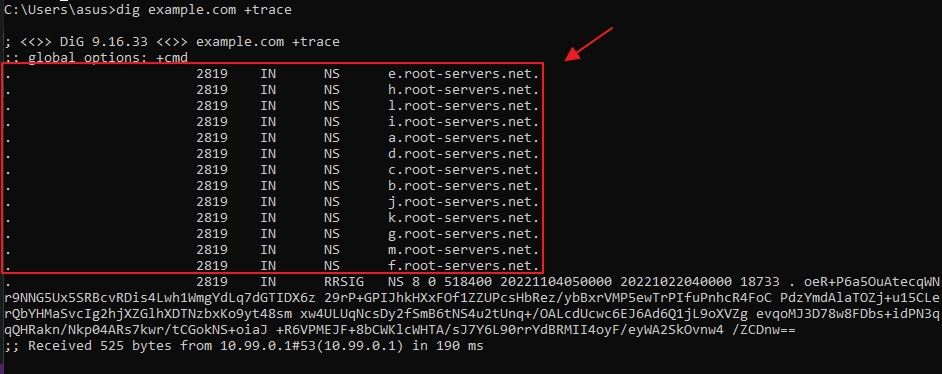
Read each delegation step in the dig
+traceoutput. dig queries the root servers first, then follows the NS referrals at each level:- Root servers (
.): dig retrieves the list of root nameservers from the system's root hints file and queries one of them for the domain. - TLD servers (
.com): The root server returns NS records pointing to the TLD nameservers for the domain's extension. - Authoritative servers (
example.com): The TLD server returns NS records pointing to the domain's authoritative nameservers. - Final answer: The authoritative nameserver returns the requested DNS record (A, AAAA, MX, etc.).
- Root servers (
Add
+nodnssecto suppress DNSSEC signature records and produce shorter output. dig excludes RRSIG records from the trace results:
dig example.com +trace +nodnssec- Combine
+tracewith a specific record type to trace the delegation for MX, NS, or other record types. dig follows the delegation path and returns the specified record from the authoritative server:
dig example.com MX +traceHow to Verify the DNS Delegation Path Was Traced Successfully
Domain Information Groper (dig) confirms a complete trace when the output shows all four delegation steps: root servers, TLD servers, authoritative servers, and the final answer. The last line of each step shows
Received N bytes from <server>, identifying which server provided the referral. A successful trace ends with the A record (or other requested type) from the authoritative nameserver.
Common Issues When Tracing DNS Delegation with dig
- Trace stops at root servers: A firewall may block outbound DNS queries on port 53 to external nameservers. dig
+tracesends iterative queries to each server in the chain, requiring direct access to root, TLD, and authoritative servers. - CNAME encountered during trace: dig follows the delegation to the CNAME target but does not automatically restart the trace for the canonical name. Run a second
dig +tracefor the CNAME target domain to see its full delegation path. - Trace shows
SERVFAILat a specific step: One of the nameservers in the delegation chain is misconfigured or unreachable. TheReceived N bytes from <server>line identifies which server failed. Contact the domain administrator or DNS provider to investigate. - Output includes DNSSEC RRSIG records: dig
+tracedisplays DNSSEC signature records by default. Add+nodnssecto suppress them for cleaner output. - Different results from
dig +traceanddigwithout trace: dig+tracebypasses the local resolver's cache and queries each server directly. A regular dig query uses the system resolver, which may return cached results with a lower TTL.