
dig Explanations
Conceptual explanations of DNS query output, record types, and how dig resolves domain names through the DNS hierarchy.
Conceptual articles explaining how Domain Information Groper (dig) queries DNS servers, how to interpret dig output sections, and the difference between short and detailed query responses.
Short Answers vs. Detailed Answers in dig Output
Domain Information Groper (dig) displays a detailed response by default. The detailed output includes the HEADER section with query status flags, the QUESTION section repeating the query, the ANSWER section with the returned DNS records, the AUTHORITY section listing authoritative nameservers, and the statistics footer showing query time, responding server IP address, port number, and message size.
$ dig example.com

; <<>> DiG 9.18.28 <<>> example.com
;; global options: +cmd
;; Got answer:
;; ->>HEADER<<- opcode: QUERY, status: NOERROR, id: 62896
;; flags: qr rd ra ad; QUERY: 1, ANSWER: 1, AUTHORITY: 0, ADDITIONAL: 1

;; OPT PSEUDOSECTION:
; EDNS: version: 0, flags:; udp: 1232
;; QUESTION SECTION:
;example.com.                   IN      A

;; ANSWER SECTION:
example.com.        86400   IN      A       93.184.216.34

;; Query time: 45 msec
;; SERVER: 10.99.0.1#53(10.99.0.1)
;; WHEN: Sat Mar 08 12:05:08 UTC 2026
;; MSG SIZE rcvd: 56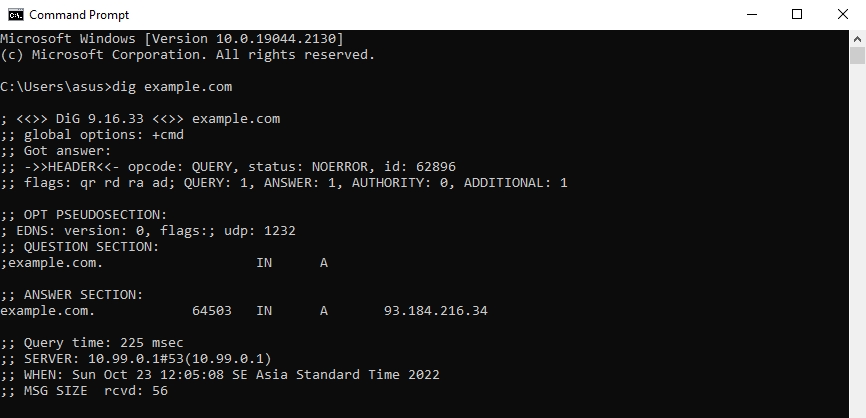
dig displays a short-form answer when the
+short query option is appended. The
+short flag suppresses all metadata sections and returns the record value alone -- typically the IP address for an A record query. This format is useful for scripting and quick lookups where the full DNS response details are unnecessary.
dig example.com +short
93.184.216.34