
CORS tutorial: How Cross-Origin Resource Sharing works
Understand how CORS enforces browser security through the same-origin policy, preflight OPTIONS requests, and Access-Control response headers.
- What You Will Need
- Step 1: Understand the Same-Origin Policy That CORS Extends
- Step 2: Learn How the Browser Handles a Simple CORS Request
- Step 3: Understand the CORS Preflight Sequence
- Step 4: Learn How CORS Handles Credentialed Requests
- Step 5: Verify CORS Headers with Browser Developer Tools
- What You Learned
- What to Do Next
This tutorial explains how Cross-Origin Resource Sharing (CORS) controls cross-origin HTTP requests in the browser. By the end, you will understand the same-origin policy, the preflight mechanism, and how CORS response headers grant or deny access.
What You Will Need
- A modern web browser (Chrome, Firefox, Safari, or Edge) with developer tools.
- A basic understanding of HTTP request and response headers.
Step 1: Understand the Same-Origin Policy That CORS Extends
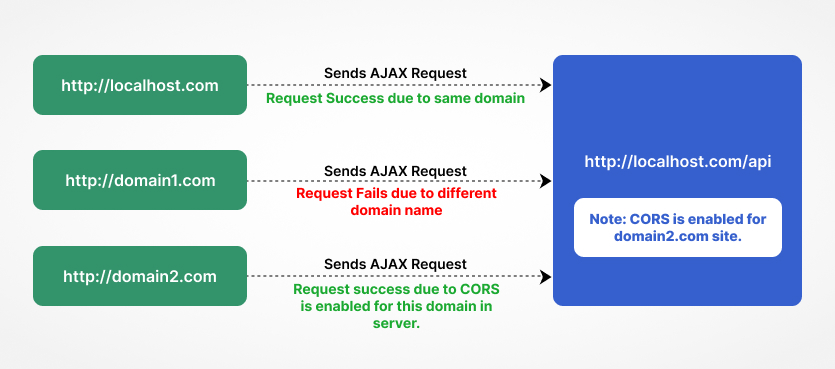
Cross-Origin Resource Sharing (CORS) exists because browsers enforce the same-origin policy. The same-origin policy prevents JavaScript on one page from reading data returned by a different origin. Two URLs share the same origin only when their scheme, hostname, and port all match.
CORS triggers whenever a browser request crosses an origin boundary. The following scenarios are all cross-origin:
- Different domain:
website1.comrequests a resource fromapi.website2.com. - Different subdomain:
app.example.comrequests a resource fromapi.example.com. - Different port:
example.com:3000requests a resource fromexample.com:8080. - Different scheme:
http://example.comrequests a resource fromhttps://example.com.
The same-origin policy protects users from malicious scripts that could steal data from another site. CORS provides a controlled way for servers to opt in to cross-origin access without disabling this protection entirely.
Step 2: Learn How the Browser Handles a Simple CORS Request
Cross-Origin Resource Sharing (CORS) classifies certain requests as "simple" and sends them without a preflight step. A simple CORS request meets all of the following conditions:
- The HTTP method is GET, HEAD, or POST.
- The request uses only CORS-safe-listed headers:
Accept,Accept-Language,Content-Language, andContent-Type. - The
Content-Typeheader (if present) isapplication/x-www-form-urlencoded,multipart/form-data, ortext/plain.
The browser sends a simple CORS request directly to the server and includes the
Origin header. The server examines the
Origin value and decides whether to grant access. If the server permits the request, it returns the
Access-Control-Allow-Origin header in the response.
The server responds in one of three ways:
Access-Control-Allow-Origin: https://website1.com-- grants access to that specific origin.Access-Control-Allow-Origin: *-- grants access to any origin (not valid for credentialed requests).- No
Access-Control-Allow-Originheader -- the browser blocks JavaScript from reading the response.
The browser enforces this decision. The server still processes the request and sends a response, but the browser prevents JavaScript from accessing the response body when the header is missing or does not match.
Step 3: Understand the CORS Preflight Sequence
Cross-Origin Resource Sharing (CORS) requires a preflight request when the actual request does not qualify as "simple." The browser automatically sends an OPTIONS request before the actual request to verify that the server accepts the intended method, headers, and origin.
A CORS preflight request is triggered when any of these conditions apply:
- The HTTP method is PUT, PATCH, DELETE, or any method other than GET, HEAD, or POST.
- The request sets custom headers such as
Authorization,X-Custom-Header, orX-Requested-With. - The
Content-Typeheader isapplication/jsonor any type other than the three simple types.
The preflight sequence has two phases. First, the browser sends an OPTIONS request with these headers:
OPTIONS /api/data HTTP/1.1
Host: api.example.com
Origin: https://app.example.com
Access-Control-Request-Method: PUT
Access-Control-Request-Headers: Content-Type, Authorization
The
Access-Control-Request-Method header declares the HTTP method the browser intends to use. The
Access-Control-Request-Headers header lists the custom headers the actual request will include.
Second, the server responds with the CORS preflight headers:
HTTP/1.1 204 No Content
Access-Control-Allow-Origin: https://app.example.com
Access-Control-Allow-Methods: GET, POST, PUT, DELETE
Access-Control-Allow-Headers: Content-Type, Authorization
Access-Control-Max-Age: 86400
The
Access-Control-Max-Age header tells the browser how many seconds it can cache this preflight response. Caching avoids repeated OPTIONS requests for the same endpoint. The browser sends the actual request only after the preflight succeeds.
Step 4: Learn How CORS Handles Credentialed Requests
Cross-Origin Resource Sharing (CORS) blocks cookies, HTTP authentication headers, and TLS client certificates on cross-origin requests by default. The browser does not send credentials unless the client explicitly opts in, and the server explicitly allows them.
The client enables credentials by setting
credentials: 'include' on a Fetch request:
fetch('https://api.example.com/data', {
  method: 'GET',
  credentials: 'include'
});
The server must respond with both of these headers for credentialed CORS requests to succeed:
Access-Control-Allow-Origin: https://app.example.com
Access-Control-Allow-Credentials: true
The
Access-Control-Allow-Origin header must specify an explicit origin. The wildcard
* is not valid when
Access-Control-Allow-Credentials is
true. The browser rejects the response and logs a CORS error if the server sends
Access-Control-Allow-Origin: * with credentials enabled.
Step 5: Verify CORS Headers with Browser Developer Tools
Cross-Origin Resource Sharing (CORS) errors appear in the browser's console tab. Open the browser developer tools (F12 or Cmd+Option+I on macOS) and check the Console and Network tabs to inspect CORS behavior.
Test a preflight request from the command line using
curl to verify the server returns the expected CORS headers:
curl -X OPTIONS https://api.example.com/data \
  -H "Origin: https://app.example.com" \
  -H "Access-Control-Request-Method: PUT" \
  -H "Access-Control-Request-Headers: Content-Type, Authorization" \
  -i
The response should include
Access-Control-Allow-Origin,
Access-Control-Allow-Methods, and
Access-Control-Allow-Headers. A missing or incorrect header causes the browser to block the actual request.
What You Learned
Cross-Origin Resource Sharing (CORS) is an HTTP-header-based mechanism that controls cross-origin access in the browser. The same-origin policy blocks cross-origin requests by default; CORS provides a way for servers to opt in. Simple requests skip the preflight step and go directly to the server. Non-simple requests trigger an OPTIONS preflight that the server must answer with the correct CORS headers. Credentialed requests require an explicit origin and
Access-Control-Allow-Credentials: true.
For platform-specific configuration steps, see the CORS how-to guides.
What to Do Next
- Configure CORS on your server. See How to configure CORS on Nginxor How to configure CORS on Apache HTTP Server.
- Review security recommendations in CORS best practices.
- Debug specific errors in CORS troubleshooting.