
CORS: No 'Access-Control-Allow-Origin' header is present on the requested resource
Fix the CORS error where the server response lacks the Access-Control-Allow-Origin header by configuring the correct response header on the server.
Cross-Origin Resource Sharing (CORS) produces the "No 'Access-Control-Allow-Origin' header is present on the requested resource" error when the server response does not include the
Access-Control-Allow-Originheader.
When CORS Produces This Error
Cross-Origin Resource Sharing (CORS) produces this error when a browser makes a cross-origin request and the server's response does not include the
Access-Control-Allow-Origin header. The browser blocks JavaScript from reading the response body and logs the error in the console.
CORS produces this same error during a preflight OPTIONS request when the server does not return the
Access-Control-Allow-Origin header on the preflight response. The browser cancels the actual request because the preflight failed.
What Causes "No 'Access-Control-Allow-Origin' Header" in CORS
Cross-Origin Resource Sharing (CORS) requires the server to include
Access-Control-Allow-Origin in every response to a cross-origin request. The browser checks this header before exposing the response to JavaScript. A missing header means the server has not opted in to cross-origin access.
CORS headers are missing when the server does not have CORS configured at all. Many web servers and application frameworks do not send CORS headers by default. The server processes the request and returns a valid response, but the browser blocks it because the required header is absent.
CORS headers may also be missing when the server only returns them on successful responses (2xx status codes) but not on error responses (4xx, 5xx). Nginx's
add_header directive and Apache's
Header set directive omit headers from error responses unless explicitly configured with the
always parameter.
How to Fix "No 'Access-Control-Allow-Origin' Header" in CORS
Identify which server handles the cross-origin request. The server that receives the request must set the Cross-Origin Resource Sharing (CORS) headers -- not the server that hosts the front-end application.
Add the
Access-Control-Allow-Originheader to the server configuration. The fix depends on the platform:Apache HTTP Server-- Add the header in the
.htaccessfile or the VirtualHost configuration:<IfModule mod_headers.c> Header always set Access-Control-Allow-Origin "https://app.example.com" Header always set Access-Control-Allow-Methods "GET, POST, OPTIONS" Header always set Access-Control-Allow-Headers "Content-Type, Authorization" </IfModule>See How to configure CORS on Apache HTTP Serverfor full steps.
Nginx-- Add the header in the
serverorlocationblock:add_header 'Access-Control-Allow-Origin' 'https://app.example.com' always; add_header 'Access-Control-Allow-Methods' 'GET, POST, OPTIONS' always; add_header 'Access-Control-Allow-Headers' 'Content-Type, Authorization' always;See How to configure CORS on Nginxfor full steps.
PHP-- Call
header()at the top of the PHP file:<?php header('Access-Control-Allow-Origin: https://app.example.com'); header('Access-Control-Allow-Methods: GET, POST, OPTIONS'); header('Access-Control-Allow-Headers: Content-Type, Authorization');See How to configure CORS in PHPfor full steps.
Node.js with Express-- Install and use the
corsmiddleware:const cors = require('cors'); app.use(cors({ origin: 'https://app.example.com' }));See How to configure CORS in Node.jsfor full steps.
Python Flask-- Install and apply
flask-cors:from flask_cors import CORS CORS(app, origins=['https://app.example.com'])See How to configure CORS in Python Flaskfor full steps.
Python Django-- Install
django-cors-headersand add the origin toCORS_ALLOWED_ORIGINSinsettings.py:CORS_ALLOWED_ORIGINS = [ 'https://app.example.com', ]See How to configure CORS in Python Djangofor full steps.
Restart or reload the web server to apply the configuration changes.
How to Verify the Fix
Send a cross-origin request with
curl and check that the response includes the
Access-Control-Allow-Origin header:
curl -I -H "Origin: https://app.example.com" https://api.example.com/endpointCORS is working when the response contains:
Access-Control-Allow-Origin: https://app.example.com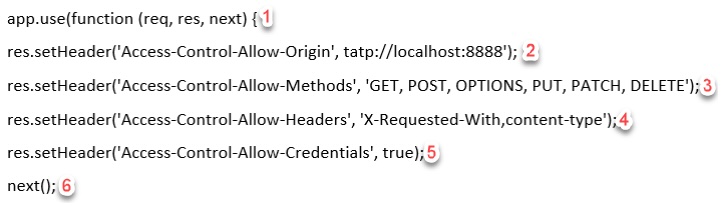
Edge Cases and Variations
CORS errors that appear only on error responses (404, 500) indicate the server uses
Header set (Apache) or
add_header without
always (Nginx). These directives skip non-2xx responses. Change to
Header always set in Apache or add the
always parameter in Nginx.
CORS errors that appear only on preflight requests indicate the server does not handle OPTIONS requests. Configure the server to return a
204 response with CORS headers for OPTIONS requests. See
CORS best practicesfor preflight handling recommendations.
CORS errors that appear only in production but not in development may indicate a reverse proxy or CDN that strips or caches CORS headers. Include
Vary: Origin in the response to prevent cache poisoning.
Related CORS Errors
- CORS: Origin is not allowed by Access-Control-Allow-Origin-- the header exists but does not match the requesting origin.
- CORS: Cross origin requests are only supported for HTTP-- the page uses a
file://URL that does not support CORS.