
CORS (Cross-Origin Resource Sharing)
Cross-Origin Resource Sharing (CORS) controls which origins can access resources across domains using HTTP headers enforced by the browser.
- What CORS Does and When You Need It
- Core Concepts of CORS
- Same-Origin Policy in CORS
- Simple Requests in CORS
- Preflight Requests in CORS
- Credentialed Requests in CORS
- Common Tasks with CORS
- How to Configure CORS on Apache HTTP Server
- How to Configure CORS on Nginx
- How to Configure CORS in Node.js with Express
- How to Configure CORS in PHP
- How to Configure CORS in Python Django
- How to Configure CORS in Python Flask
- How to Configure CORS on Amazon S3
- CORS Headers Reference
- CORS Troubleshooting
Cross-Origin Resource Sharing (CORS) is an HTTP-header-based security mechanism that allows a server to specify which origins can access its resources through a web browser.
What CORS Does and When You Need It
Cross-Origin Resource Sharing (CORS) extends the browser's same-origin policy. The same-origin policy blocks web pages from making requests to a different domain, protocol, or port than the one that served the page. CORS relaxes this restriction by letting servers declare which external origins may access their resources.
CORS applies to all browser-based HTTP requests made by the XMLHttpRequest API and the Fetch API. Without CORS headers, the browser blocks cross-origin responses before JavaScript can read them. The server must include specific
Access-Control-Allow-* response headers to grant access.
CORS does not apply to server-to-server requests. Backend services, CLI tools, and mobile apps that do not run in a browser ignore CORS headers entirely. CORS protects browser users from malicious scripts that attempt to read data from other origins without authorization.
Core Concepts of CORS
Same-Origin Policy in CORS
Cross-Origin Resource Sharing (CORS) builds on the same-origin policy that all modern browsers enforce. Two URLs share the same origin when they match in scheme (HTTP or HTTPS), hostname, and port. A request from
https://app.example.com to
https://api.example.com is cross-origin because the hostnames differ. A request from
http://example.com to
https://example.com is cross-origin because the schemes differ.
Simple Requests in CORS
Cross-Origin Resource Sharing (CORS) classifies some requests as "simple" and lets them skip the preflight step. A simple request uses GET, HEAD, or POST with only standard headers such as
Accept,
Accept-Language,
Content-Language, and
Content-Type. The
Content-Type header must be
application/x-www-form-urlencoded,
multipart/form-data, or
text/plain. The browser sends simple requests directly and checks the
Access-Control-Allow-Origin response header before exposing the result to JavaScript.
Preflight Requests in CORS
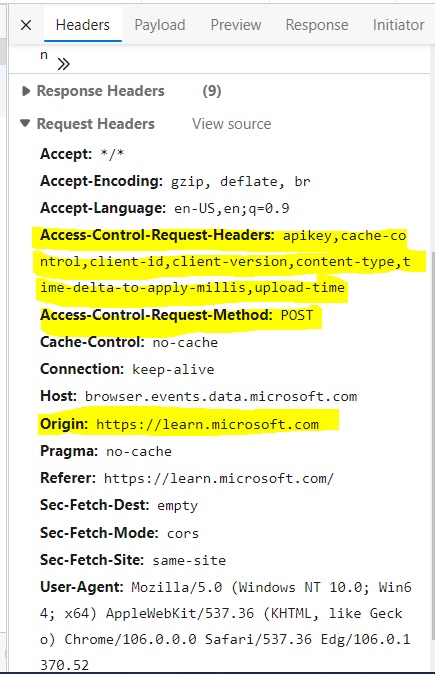
Cross-Origin Resource Sharing (CORS) requires a preflight request for any request that does not qualify as "simple." The browser sends an HTTP OPTIONS request before the actual request to ask the server whether it accepts the method, headers, and origin. The server responds with
Access-Control-Allow-Methods,
Access-Control-Allow-Headers, and
Access-Control-Allow-Origin headers. The browser proceeds with the actual request only if the preflight response permits it.
Credentialed Requests in CORS
Cross-Origin Resource Sharing (CORS) blocks cookies and authentication headers on cross-origin requests by default. To include credentials, the client must set
credentials: 'include' on the Fetch request or
withCredentials = true on XMLHttpRequest. The server must respond with
Access-Control-Allow-Credentials: true and an explicit origin in
Access-Control-Allow-Origin. The wildcard
* is not valid for credentialed requests.
Common Tasks with CORS
How to Configure CORS on Apache HTTP Server
Apache HTTP Server sets CORS headers through the
mod_headers module. Enable the module and add the
Access-Control-Allow-Origin header to the server configuration or
.htaccess file. See
How to configure CORS on Apache HTTP Serverfor full steps.
How to Configure CORS on Nginx
Nginx sets CORS headers with the
add_header directive inside a
server or
location block. Handle preflight OPTIONS requests by returning a
204 response with the required CORS headers. See
How to configure CORS on Nginxfor full steps.
How to Configure CORS in Node.js with Express
Node.js applications using Express add CORS support through the
cors npm package. Install the package and call
app.use(cors()) to enable CORS for all routes. See
How to configure CORS in Node.jsfor full steps.
How to Configure CORS in PHP
PHP sets CORS headers with the
header() function at the top of the script before any output. Set
Access-Control-Allow-Origin,
Access-Control-Allow-Methods, and
Access-Control-Allow-Headers as needed. See
How to configure CORS in PHPfor full steps.
How to Configure CORS in Python Django
Python Django adds CORS support through the
django-cors-headers package. Install the package, register it in
INSTALLED_APPS, add the middleware, and set
CORS_ALLOWED_ORIGINS. See
How to configure CORS in Python Djangofor full steps.
How to Configure CORS in Python Flask
Python Flask adds CORS support through the
flask-cors package. Install the package and wrap the Flask app with
CORS(app). See
How to configure CORS in Python Flaskfor full steps.
How to Configure CORS on Amazon S3
Amazon S3 buckets accept a JSON-based CORS configuration in the bucket's Permissions tab. Define
AllowedOrigins,
AllowedMethods, and
AllowedHeaders for each CORS rule. See
How to configure CORS on Amazon S3for full steps.
CORS Headers Reference
Cross-Origin Resource Sharing (CORS) uses the following HTTP response headers. The server must include these headers for the browser to permit cross-origin access.
| Header | Purpose | Example |
|---|---|---|
Access-Control-Allow-Origin | Specifies which origin may access the resource. Use a single origin or
* for public resources. | Access-Control-Allow-Origin: https://example.com |
Access-Control-Allow-Methods | Lists the HTTP methods the server permits for cross-origin requests. Returned in preflight responses. | Access-Control-Allow-Methods: GET, POST, PUT, DELETE |
Access-Control-Allow-Headers | Lists the HTTP headers the client may send in the actual request. Returned in preflight responses. | Access-Control-Allow-Headers: Content-Type, Authorization |
Access-Control-Allow-Credentials | Indicates whether the browser should include cookies and authentication in the request. Must be
true for credentialed requests. | Access-Control-Allow-Credentials: true |
Access-Control-Max-Age | Specifies how long (in seconds) the browser may cache the preflight response. | Access-Control-Max-Age: 86400 |
Access-Control-Expose-Headers | Lists response headers that JavaScript may read beyond the default safe-listed headers. | Access-Control-Expose-Headers: X-Request-Id |
For a full reference, see CORS headers reference.
CORS Troubleshooting
Cross-Origin Resource Sharing (CORS) errors appear in the browser console when the server response lacks the required headers. The table below lists common CORS errors and their causes.
| Error | Cause | Fix |
|---|---|---|
| "No 'Access-Control-Allow-Origin' header is present on the requested resource" | The server does not return the
Access-Control-Allow-Origin header. | Full article |
| "Origin is not allowed by Access-Control-Allow-Origin" | The server returns
Access-Control-Allow-Origin but the requesting origin does not match the allowed value. | Full article |
| "Cross origin requests are only supported for HTTP" | The browser loaded the page from a
file:// URL or a non-HTTP scheme, which does not support CORS. | Full article |